Disclosure: As an Amazon Associate, we earn from qualifying purchases. If you click a link on this page and make a purchase, we may receive a small commission at no extra cost to you.
Choosing a radar detector is not only about maximum range. You also need to consider false alerts, GPS tools, update support, mounting rules, and how much setup you are willing to do. The Uniden R3 radar detector combines long-range radar and laser detection with built-in GPS, voice alerts, and a multi-color OLED display. This review helps you decide if those strengths still make the R3 a smart buy for highways, daily commutes, and road trips. Its main tradeoffs are the lack of directional arrows, wired power, and filtering that may need careful tuning in dense city traffic.
Quick Verdict
Rating: 8.5/10, Recommended with caveats
Best For: Highway drivers, road-trippers, and commuters who want strong range with GPS lockouts.
Bottom Line: The Uniden R3 gives you strong long-range detection, GPS-based Mute Memory, camera alerts, and clear voice and screen information. Skip it if you want directional arrows, wireless updates, app control, or the newest automatic false-alert filtering.
| Specification | Detail |
|---|---|
| Brand | Uniden |
| Model | R3 |
| Product type | Long-range radar and laser detector with built-in GPS |
| Detected bands | X, K, Ka, and laser, with selectable band controls |
| Frequency range | X 10.525 GHz, K 24.150 GHz, Ka 33.400 to 35.700 GHz, laser 800 nm to 1,100 nm |
| Driving modes | Highway, City, and Advanced with adjustable X, K, and Ka sensitivity |
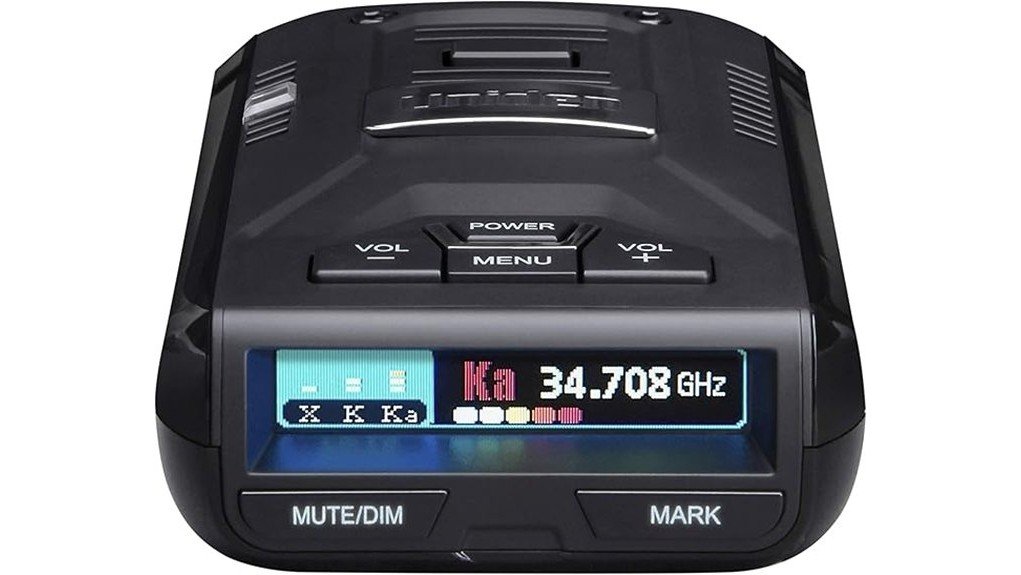
| Display | Multi-color OLED with band, frequency, signal strength, speed, and status information |
| GPS features | Mute Memory, user marks, red light camera alerts, speed camera alerts, Quiet Ride, and overspeed warnings |
| GPS lockout capacity | Up to 500 Mute Memory points |
| False-alert controls | K and Ka filters, Traffic Sensor Filter, K Block filters, City mode, and GPS lockouts |
| Power | DC 11.0 to 16.0 V, with 12V DC RJ11 power cord included |
| Manufacturer-listed size | 4.88 in depth x 3.85 in width x 1.52 in height |
| Manufacturer-listed unit weight | 4.9 oz, 140 g |
| Mounting options | Windshield mounting with the included single-cup or double-cup bracket; dashboard mounting is also described in the manual |
| Included accessories | R3 detector, 12V DC RJ11 power cord, premium suction cup mount, double cup windshield mount, and carrying case |
| Update connection | USB connection to a computer for firmware and GPS database updates |
| Warranty | One-year limited manufacturer warranty |
| ASIN | B0743H6CSN |
What Is the Uniden R3?
The Uniden R3 is a compact vehicle-mounted receiver that detects X, K, and Ka radar signals plus laser. Its built-in GPS adds location-based tools, including camera alerts, user marks, and Mute Memory for repeat stationary signals along routes you drive often.
The R3 is not a dash cam, police scanner, jammer, or navigation unit. It does not show the direction of a radar source because it uses a single non-directional alert display rather than front and rear directional arrows. It is made for drivers who value early warning, detailed controls, and a quieter repeat-route experience more than app features or wireless updates.
Before You Buy: Radar detector and windshield-mount laws vary by location and vehicle type. Virginia prohibits radar detectors in vehicles on public highways, and federal rules prohibit their use or possession in commercial motor vehicles. Military installations and countries outside the United States may have separate restrictions, so check current rules before you mount or carry the R3.
Who Should Buy It?
Best For
- Highway drivers who want strong long-range radar sensitivity.
- Commuters who pass the same false-alert locations often.
- Drivers who want GPS camera alerts and up to 500 saved false-alert locations without moving to an arrow-equipped flagship.
Skip If
- You want directional arrows that show where the signal is coming from.
- You need built-in Wi-Fi, Bluetooth, or app-based control.
- You drive mostly in dense urban areas and want the newest false-alert filtering.
Key Takeaways
- The Uniden R3 is a long-range radar and laser detector with built-in GPS, voice alerts, and a multi-color OLED display.
- Its GPS tools include Mute Memory for up to 500 saved lockouts, user marks, and red light or speed camera alerts.
- Highway, City, and Advanced modes let you control X, K, and Ka sensitivity for different roads.
- It uses vehicle DC power through a 12V RJ11 cord, so it is not a cordless or lithium-ion battery-powered detector.
- It is strongest on highways and repeat routes, but city driving may still require filter and sensitivity tuning.
Detection Range and Radar Performance
The Uniden R3’s main selling point is long-range sensitivity. On an open highway with a clear line of sight, it has more opportunity to detect radar reflections before you reach the source. Curves, hills, traffic, terrain, weather, radar power, and mounting position can all shorten warning distance, so no fixed mileage claim applies to every drive.
The R3 scans X, K, and Ka bands plus laser. Highway mode uses full sensitivity. City mode lowers X- and K-band sensitivity while keeping Ka sensitivity at the Highway level. Advanced mode lets you reduce X, K, and Ka sensitivity from 100% to 30% in 10% steps, which is useful when the default modes are too noisy for your area.
Laser alerts need realistic expectations. A laser beam is narrow and targeted, so an alert may arrive only after your vehicle has been measured. Treat the R3 as an awareness aid, not as protection from a ticket or a reason to ignore speed limits and road conditions.
How GPS Functionality Enhances Daily Driving
The built-in GPS is one of the strongest reasons to choose the R3 over a basic non-GPS detector. When a stationary false alert appears at the same location and frequency, you can save it with Mute Memory. The detector supports up to 500 saved Mute Memory points, which is enough for many regular commutes and shopping routes.
GPS also supports user marks, Quiet Ride settings, overspeed warnings, and alerts for red light or speed camera points in the installed database. These tools reduce repeated noise and add location awareness, but they do not replace posted signs or current traffic laws.
Mute Memory is not fully automatic on the R3. You first mute the alert, then press the mute control again while the mute message is displayed to save that location and frequency. This extra step helps prevent the detector from locking out a signal you did not intend to ignore.
Key Features That Improve the User Experience
Multi-Color OLED Display and Dimming
The OLED display can show band type, frequency, signal strength, vehicle speed, voltage, camera distance, and status information such as Mute Memory or Quiet Ride. Bright, Dim, Dimmer, Dark, Off, and Auto settings give you more control over glare. Dark mode keeps the screen mostly off until an alert, which can reduce distraction and help limit static-image burn-in.
Voice Alerts and Selectable Tones
Voice alerts announce radar or laser types and camera warnings so you do not need to read every screen change. You can also choose alert tones for supported bands and enable Ka frequency voice announcements. Set these options while parked so you are not using the menu while driving.
Highway, City, and Advanced Modes
Highway mode keeps full sensitivity for open roads. City mode reduces X- and K-band sensitivity to cut nuisance alerts while leaving Ka sensitivity unchanged. Advanced mode gives you separate X, K, and Ka sensitivity control, which is useful when your local alert environment does not fit either preset.
K, Ka, and Traffic Sensor Filtering
The R3 includes K and Ka filters, a Traffic Sensor Filter, and multiple K Block settings designed to reduce false alerts from traffic monitoring systems and some vehicle safety sensors. These tools can make city driving quieter, but aggressive filtering may also reduce sensitivity to weak signals. Change one setting at a time and test it on familiar routes.
Mute Memory, Quiet Ride, and User Marks
Mute Memory saves a location and frequency after you confirm it, while Quiet Ride can mute X- and K-band alerts below a speed you choose. User marks create a manual location reminder for places you want to remember. These features serve different jobs, so you should not treat a user mark as a false-alert lockout.
Pro Tip: Begin with Highway mode on open roads and City mode in busy areas. Save only repeat stationary alerts with Mute Memory, and change one filter at a time so you can tell which setting actually reduces noise.
How It Performs in Real Use
For Highway Driving
The R3 is at its best on highways and open roads. A clear forward view and full Highway sensitivity give the detector the best chance to identify weak radar reflections early. Hills, bends, traffic, and instant-on radar can still reduce warning time.
For City Commuting
City driving produces more K-band noise from automatic doors, traffic sensors, and nearby vehicle safety systems. City mode, K filters, Traffic Sensor Filter, and Mute Memory can reduce repeated alerts, but the setup may take several commutes. Drivers who expect silent automatic filtering may prefer a newer connected model.
For Regular Routes
Repeat routes show the R3’s GPS advantage. After you save recurring stationary false alerts, the detector can stay quieter at those stored locations and frequencies. Because the R3 supports up to 500 lockouts, you can build a useful map of daily nuisance alerts over time.
For Road Trips
On unfamiliar roads, voice alerts and the installed red light or speed camera database can add useful awareness without making you stare at the display. Update the database before a long trip and follow posted signs because camera locations, enforcement practices, and local laws can change.
Setup Tips Before First Use
Mount the R3 with a clear forward view and no obstruction in front of the detector. Uniden describes windshield mounting near the center between the driver and passenger, but your safest legal position depends on local windshield-mount rules and your vehicle’s sight lines. Do not place the unit where it blocks the road, mirrors, airbags, or controls.
Connect the RJ11 plug to the detector and the adapter to your vehicle’s 12V outlet. The R3 turns on with vehicle power in many cars, but outlet behavior varies. If your outlet stays live after the engine is off, turn the detector off or unplug it to avoid unnecessary battery drain.
Update the firmware and GPS database through Uniden’s R-Series update resources before you depend on camera alerts. Then choose Highway, City, or Advanced mode, set display brightness, and adjust voice volume while parked. Avoid changing detailed menu settings while driving.
Common Setup Mistakes to Avoid
- Mounting the detector behind an obstruction or where it blocks your view.
- Turning off several radar bands before learning which alerts are false in your area.
- Saving a moving or uncertain signal as a Mute Memory location.
- Assuming the camera database is current without checking for updates.
Compatibility and Safety Notes
The R3 works in vehicles that can supply DC 11.0 to 16.0 volts through the included 12V power cord. It does not have a rechargeable battery, built-in Wi-Fi, or Bluetooth app control. You need a computer and USB connection for firmware and camera-database updates.
Legal use depends on where you drive, the vehicle type, and how you mount the detector. Check current state, federal, military-installation, and local windshield rules before use. Never adjust the menu while the vehicle is moving.
The R3 cannot guarantee protection from tickets or every enforcement method. Radar may be triggered only when an officer targets traffic, and laser is narrow enough that an alert can arrive after measurement. Keep your speed legal and use the detector only as an added awareness tool.
User Feedback on the Uniden R3: What to Expect
Buyer feedback often centers on the same strengths covered in this review: long highway range, clear voice and OLED alerts, and GPS lockouts that make repeat routes quieter. The R3 remains appealing because it provides detailed controls without forcing you into an arrow-equipped premium model.
The recurring tradeoffs are city false alerts, the time needed to learn the menu, wired power, and the lack of directional arrows. Your experience will depend heavily on local radar sources and how carefully you configure the filters and sensitivity modes.
Warranty, Updates, and Support
Uniden lists a one-year limited warranty for the R3. Keep your receipt or proof of purchase, and review the current seller and regional warranty terms because coverage and handling can differ for new, renewed, or third-party units.
Uniden continues to provide the R3 owner’s manual, firmware files, GPS database files, and R-Series update tools. Updates require more work than a Wi-Fi model because you connect the detector to a computer, but ongoing update support helps an older detector remain practical.
Pros and Cons
Pros
- Strong long-range radar detection for highway and open-road driving.
- Built-in GPS stores up to 500 Mute Memory points for repeat stationary alerts.
- Highway, City, and Advanced modes provide useful sensitivity control.
- Voice alerts, selectable tones, and the OLED display make warnings easier to understand quickly.
- Includes two windshield-mount options, a 12V DC RJ11 power cord, and a carrying case.
Cons
- No directional arrows, so you will not know where the signal comes from.
- Urban false alerts may still require filter tuning and careful GPS lockouts.
- Wired power and computer-based updates are less convenient than Wi-Fi or app-based models.
Is It Worth the Price?
The Uniden R3 sits in the mid-range to upper-mid-range part of the detector market, depending on current seller pricing. Its value comes from long-range sensitivity, GPS lockouts, detailed controls, and continued firmware and database support rather than wireless convenience.
You get the most value if you spend meaningful time on highways or repeat commuter routes and do not need directional arrows. It is less compelling for city-only driving, for a vehicle without a convenient 12V outlet, or for buyers who want phone-based setup and automatic wireless updates.
How It Compares to Alternatives
The Uniden R4 is the closest step up if you want newer detection hardware while keeping a compact single-display design. The Uniden R7 and R8 are better choices when front and rear directional arrows matter more than a lower purchase cost.
Connected alternatives from Cobra or Escort may suit you better if app alerts, Bluetooth, or wireless features are priorities. The R3 makes the most sense when you prefer strong range, GPS lockouts, and direct on-device controls without paying for arrows or connected features.
Frequently Asked Questions
Does the Uniden R3 need batteries?
No. The R3 uses DC vehicle power through the included 12V RJ11 power cord. It does not have a rechargeable lithium-ion battery for cordless use.
How far can the Uniden R3 detect radar?
The R3 is designed for long-range detection, especially on open roads with clear line of sight. Actual warning distance changes with radar band, terrain, traffic, hills, curves, weather, radar use, and mounting position, so a fixed range claim would be misleading.
How many false-alert locations can the R3 remember?
The R3 can store up to 500 Mute Memory points. Each lockout is tied to a GPS location and frequency, so save only stationary repeat alerts that you recognize.
Does the Uniden R3 have a smartphone app?
No built-in Wi-Fi or Bluetooth app controls are listed for the R3. You adjust settings on the detector and use a computer with Uniden’s update tool for firmware and GPS database files.
Is the Uniden R3 easy to install?
Basic installation is simple: attach an included mount, connect the RJ11 power cord, and select a driving mode. The more time-consuming part is tuning filters, sensitivity, brightness, and GPS features for your routes.
Can the Uniden R3 reduce false alerts?
Yes. City mode, K and Ka filters, Traffic Sensor Filter, K Block filters, Quiet Ride, and Mute Memory can reduce nuisance alerts. The system is not fully automatic, so some trial and error is normal in busy areas.
Can I use the Uniden R3 in different countries?
Check local detector laws and radar-band use before taking the R3 outside your home region. Legal status, supported radar systems, power arrangements, and camera-database coverage vary by country.
Who should skip the Uniden R3?
Skip it if you want directional arrows, wireless updates, app control, or newer automatic false-alert filtering. It is also a poor fit where detector use or windshield mounting is restricted.
The Bottom Line
The Uniden R3 earns its recommended-with-caveats verdict for highway drivers and repeat-route commuters who want strong range, up to 500 GPS lockouts, voice alerts, and detailed on-device controls. Skip it if you mainly drive in dense city traffic or need directional arrows, app control, wireless updates, or a cordless setup.