Disclosure: As an Amazon Associate, we earn from qualifying purchases. If you click a link on this page and make a purchase, we may receive a small commission at no extra cost to you.
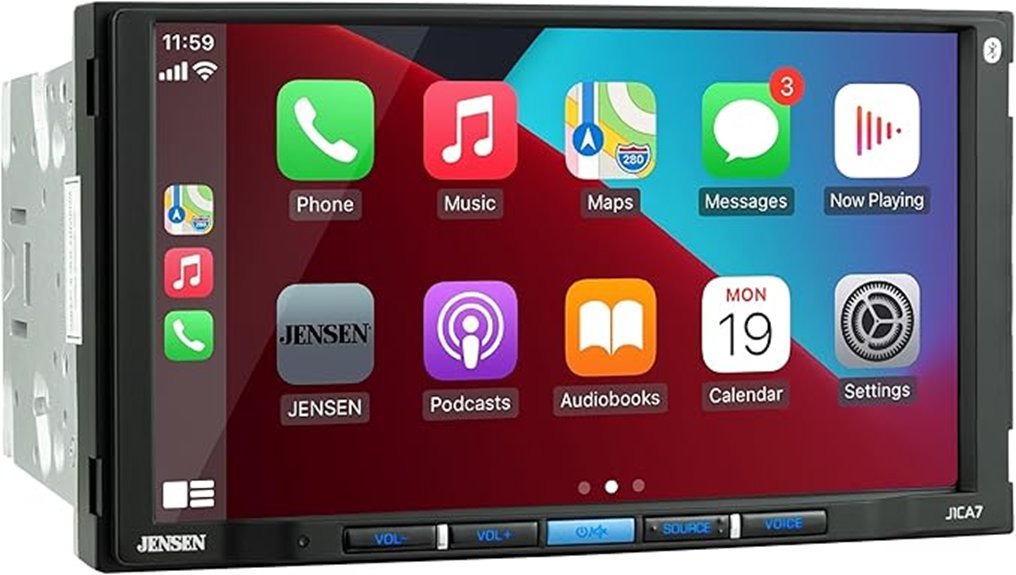
A factory radio can feel dated when you depend on phone navigation, streaming audio, and hands-free calls. The Jensen J1CA7 adds a 7-inch capacitive touchscreen, wired Apple CarPlay, wired Android Auto, Bluetooth, a backup-camera input, and useful audio controls in a double DIN receiver. This review explains what the J1CA7 does well, what extra installation parts you may need, and where its lower-cost design falls behind newer wireless models. Its main strength is practical smartphone integration, while its main limitation is vehicle-specific installation and wired phone projection.
Quick Verdict
Rating: 8/10, recommended with caveats
Best For: Drivers who want wired CarPlay and Android Auto, Bluetooth calling, a 7-inch screen, and expandable audio outputs in a standard double DIN opening.
Bottom Line: The Jensen J1CA7 gives you a useful mix of phone integration, audio tuning, and camera support without moving into a premium receiver tier. You should skip it if wireless phone projection, a brighter premium display, or simple plug-and-play installation is essential.
| Specification | Detail |
|---|---|
| Brand | Jensen |
| Model | J1CA7 |
| Product Type | Double DIN digital multimedia receiver |
| Display | 7-inch capacitive LED-backlit LCD touchscreen |
| Resolution | 1024 x 600 |
| Rated Brightness | 500 nits |
| Phone Projection | Wired Apple CarPlay and wired Android Auto through USB |
| Bluetooth | Hands-free calling, audio streaming, phonebook support, and voice activation |
| Peak Power | 240 watts peak, 60 watts x 4 channels |
| CEA-2006 Power | 16 watts RMS x 4 at 4 ohms and less than 1% THD+N |
| Audio Tuning | 8-band graphic EQ, 8 EQ presets, time alignment, loudness, and subwoofer controls |
| Preamp Outputs | 3 pairs of 4-volt outputs for front, rear, and subwoofer channels |
| USB | Rear USB input with 1.5-amp charging and MP3/FLAC playback |
| Other Inputs | Rear RCA A/V input and RCA backup-camera input |
| Steering Wheel Controls | Compatible with a separate vehicle-specific adapter |
| Radio Presets | 30 total, 18 FM and 12 AM |
| Chassis Dimensions | 7 x 5 x 4 inches (W x D x H) |
| Vehicle Electrical System | 12VDC negative ground |
| Warranty Note | Manufacturer advertises a 4-year limited warranty when registered within 60 days; verify current terms |
| Best Use | Daily phone navigation, hands-free calls, music streaming, camera integration, and basic audio expansion |
Key Takeaways
- The J1CA7 uses wired Apple CarPlay and Android Auto, so your phone must connect through the rear USB cable.
- The 7-inch capacitive screen has a verified 1024 x 600 resolution and 500-nit brightness rating.
- Its 8-band EQ, time alignment, subwoofer controls, and three pairs of 4-volt preamp outputs give you useful tuning and expansion options.
- The receiver supports a backup camera, but the camera and vehicle-specific retention adapters are not included with the base unit.
- Fit depends on your dash opening, harness, trim kit, antenna, steering-wheel controls, and factory audio system.
What Is the Jensen J1CA7?
The Jensen J1CA7 is a mechless double DIN multimedia receiver, which means it does not include a CD or DVD transport. Its main controls are built around a 7-inch capacitive touchscreen, Bluetooth, AM/FM radio, USB audio playback, Apple CarPlay, and Android Auto.
It is made for drivers who want to modernize an older dashboard without paying for a receiver centered on wireless projection or premium audio processing. You can use compatible phone apps for maps, calls, messages, and music after connecting your phone by USB. The included microphone supports Bluetooth calling and voice-assistant use.
Three pairs of 4-volt preamp outputs support front, rear, and subwoofer connections, while the backup-camera input and steering-wheel-control input can help you retain or add common vehicle features with the right adapters.
Before You Buy: Confirm the full installation package for your exact vehicle. A double DIN opening alone does not guarantee that the factory amplifier, steering-wheel controls, antenna, USB port, or backup camera will work without extra adapters.
Who Should Buy It?
Best For
- Drivers replacing an older double DIN radio that lacks CarPlay, Android Auto, or Bluetooth calling.
- Buyers who are comfortable using a USB cable for phone projection and charging.
- Audio upgrade projects that need front, rear, and subwoofer preamp outputs without a premium receiver price.
Skip If
- You need wireless CarPlay or wireless Android Auto.
- You want guaranteed plug-and-play installation with every factory feature retained.
- You need broad USB video-file support or a disc player.
Key Features of the Jensen J1CA7 Car Stereo
The J1CA7 focuses on daily-use features. Its capacitive screen has a 1024 x 600 resolution and 500-nit brightness rating, although dashboard angle and direct sunlight can still create glare.
Apple CarPlay and Android Auto launch after you connect a compatible phone through USB. Bluetooth handles wireless calls and music streaming, but it does not make phone projection wireless. An 8-band EQ, time alignment, subwoofer controls, and three pairs of 4-volt preamp outputs support cabin tuning and future amplifier upgrades.
Design and Touchscreen Experience
The 7-inch display fits within a standard double DIN-style face rather than using a floating screen. That keeps the installation visually close to a factory layout when the correct trim kit is used. Physical buttons for power, volume, source, and voice activation also give you basic controls without relying only on on-screen menus.
The screen includes day, night, and automatic dimmer modes, plus separate brightness adjustment. Those settings can reduce distraction after dark. The display is rated at 500 nits, but you should still consider the angle of your dashboard if sunlight regularly hits the radio directly.
Wired Apple CarPlay and Android Auto
The J1CA7 supports Apple CarPlay and Android Auto through its rear USB connection. Once your installer routes the USB lead to an accessible location, you can connect a compatible phone for maps, music, calls, messages, and supported apps.
- Voice Control: The external microphone and voice button let you use Siri or Google Assistant for supported tasks.
- Familiar Apps: Compatible map and audio apps appear in a simplified vehicle interface.
- Consistent Charging: The 1.5-amp USB port provides power while your phone stays connected, although it is slower than many modern fast chargers.
The wired design can be more stable than some wireless systems, but you must plug in your phone each time. Buyers who want automatic wireless connection should compare the J1CA7 with a wireless-capable receiver.
Connectivity and Expansion
Bluetooth supports hands-free calling, phonebook access, audio streaming, and voice activation. The rear USB input handles phone projection, charging, and compatible MP3 or FLAC files from a USB storage device. An external microphone is used for calls and voice commands.
Rear connections include a backup-camera input, RCA A/V input, and steering-wheel-control input. The base receiver does not list a camera as included, and factory steering-wheel buttons usually need a separate adapter.
Pro Tip: Ask the installer to route the rear USB lead to a stable, easy-to-reach location such as the center console or glove box. A loose cable behind the dash can make CarPlay or Android Auto disconnect over bumps.
Audio Performance and Tuning
The headline figure is 240 watts peak, but the more useful continuous rating is 16 watts RMS x 4 channels at 4 ohms under the listed CEA-2006 conditions. That suits everyday listening, but high-output systems still need an external amplifier.
The 8-band graphic EQ and eight presets let you shape the sound more precisely than a simple bass-and-treble control. Time alignment lets you enter speaker distances so sound from each speaker reaches the listening position more evenly. The three pairs of 4-volt preamp outputs also provide a cleaner path for adding front, rear, and subwoofer amplifiers.
Fit and Compatibility
The chassis measures 7 x 5 x 4 inches and is designed for double DIN installations. You may still need a trim kit, wiring harness, antenna adapter, factory-amplifier interface, data-bus module, or steering-wheel-control adapter.
Factory cameras and amplified audio systems can be the most complicated items to retain. Check a vehicle-specific fit guide before buying, and price every adapter before comparing the J1CA7 with a more expensive receiver. A lower receiver price does not always mean a lower installed cost.
Installation and Safety
The manufacturer recommends professional installation. The receiver uses a 12VDC negative-ground system and a 15-amp fuse. Disconnect the negative battery terminal before matching the vehicle harness to the receiver wiring.
The parking-brake safety wire must be connected correctly. Video from the external A/V input is locked out while the vehicle is moving and is intended to work only when the vehicle is in Park with the parking brake engaged. Do not bypass this safety feature.
Keep the volume low enough to hear traffic and emergency vehicles. If you are unsure about factory wiring, airbags, data-bus systems, or amplifier integration, use a qualified installer rather than cutting the factory harness.
How It Performs in Real Use
For Daily Commuting
The J1CA7 is most useful when you connect your phone at the start of each drive. CarPlay or Android Auto puts maps, audio, calls, and messages on the 7-inch screen, while the physical volume buttons remain easy to reach.
For Road Trips
Wired phone projection keeps navigation and audio running while the phone receives power. The 1.5-amp charging output may not recharge a heavily used modern phone as quickly as a separate high-output charger, so start long trips with a charged battery.
For an Amplifier and Subwoofer Upgrade
The front, rear, and subwoofer 4-volt preamp outputs give an installer separate signals for a multi-amplifier system. Time alignment, subwoofer gain, and the 8-band EQ provide a useful starting point, although advanced builds may still benefit from a dedicated digital signal processor.
For Backup-Camera Use
The camera input can add rear visibility to an older vehicle or connect to a compatible retained factory camera. Correct reverse-trigger wiring and the proper camera adapter are essential. The receiver does not make an incompatible factory camera plug in directly.
Common Setup Mistakes to Avoid
- Buying the receiver before checking the dash kit and wiring interface for your exact year, make, model, and factory audio package.
- Expecting wireless CarPlay or Android Auto when the J1CA7 requires a USB connection.
- Leaving the rear USB cable inaccessible or unsupported behind the dash.
- Assuming factory steering-wheel controls, amplifiers, USB ports, and cameras will work without separate adapters.
- Using the 240-watt peak figure as the continuous speaker-power rating instead of the verified 16-watt RMS x 4 specification.
Pros and Cons
Pros
- 7-inch capacitive screen with 1024 x 600 resolution and brightness controls.
- Wired Apple CarPlay and Android Auto for maps, calls, messages, and music.
- 8-band EQ, time alignment, subwoofer controls, and eight sound presets.
- Three pairs of 4-volt preamp outputs support future amplifier expansion.
- Backup-camera input, rear A/V input, Bluetooth, and steering-wheel-control compatibility.
Cons
- CarPlay and Android Auto require a wired USB connection.
- Vehicle-specific adapters can increase the total installed cost.
- The 1.5-amp USB port charges more slowly than many current fast-charging solutions.
Warranty and Long-Term Ownership
Jensen currently advertises a 4-year limited warranty when the J1CA7 is registered within 60 days of purchase. Warranty terms can change, so keep your receipt, register the product on time, and review the current manufacturer terms for your purchase region.
The owner’s manual recommends cleaning the screen with a dry silicone cloth or soft cloth. Avoid stiff cloths, paint thinner, alcohol, and other solvents that can scratch the panel or damage printed surfaces. Firmware and system-version information are available through the settings menu.
Is It Worth the Price?
The Jensen J1CA7 offers strong value if you want wired phone projection, a 7-inch screen, useful audio tuning, and amplifier-ready outputs. It is more complete than a basic Bluetooth-only radio.
The value depends on installation. It is a smart buy for everyday use when your vehicle needs only a standard dash kit and harness. It becomes less attractive when retaining factory cameras, amplifiers, data features, or steering-wheel controls requires several costly modules.
How It Compares to Alternatives
The Jensen J1CA7W is the closer same-brand alternative when wireless Apple CarPlay and wireless Android Auto matter more than the lowest receiver cost. The Sony XAV-AX3200 is worth comparing when you want a well-known alternative with a 6.95-inch anti-glare display, broader USB media support, and a 10-band EQ.
The J1CA7 makes the most sense when wired phone projection is acceptable and you value its 1024 x 600 screen, time alignment, and three pairs of 4-volt outputs. Compare total installed cost, not only the receiver price.
Frequently Asked Questions
Does the Jensen J1CA7 have wireless CarPlay or Android Auto?
No. Apple CarPlay and Android Auto use the rear USB connection on the J1CA7. Bluetooth is wireless for calls and audio streaming, but it does not provide wireless phone projection.
Will the Jensen J1CA7 fit every double DIN vehicle?
No. The 7 x 5 x 4-inch chassis is designed for double DIN installations, but your vehicle may still need a trim kit, harness, antenna adapter, data interface, or factory-amplifier module. Check compatibility for the exact year, trim, and audio package.
Can it retain factory steering-wheel controls?
The receiver has a steering-wheel-control input, but a compatible vehicle-specific adapter is required. Some adapters also need programming before every button works correctly.
Does the Jensen J1CA7 include a backup camera?
The base J1CA7 supports an RCA backup-camera input, but the camera is not listed as included with the receiver. A compatible camera, reverse trigger, and correct vehicle wiring are required.
What audio files can it play from USB?
The manufacturer lists MP3 and FLAC playback through USB. USB-drive compatibility can vary, so use a supported file system and check the manual when a drive or file does not appear.
Can the J1CA7 play video?
It includes a rear RCA A/V input, but the manufacturer lists MP3 and FLAC as its USB file formats. In-dash video is restricted to Park with the parking brake engaged, and the safety lockout should never be bypassed.
How do I reset the Jensen J1CA7?
For software settings, open Settings, choose Others, and use the factory-default options. If the unit stops responding, the manual also identifies a front-panel reset button that can be pressed carefully with a pen tip.
Who should skip the Jensen J1CA7?
Skip it if you need wireless phone projection, a disc player, broad USB video support, or simple installation with every factory feature retained. It is better for drivers who accept a wired setup and can confirm the required vehicle adapters before buying.
The Bottom Line
The Jensen J1CA7 is a good fit for drivers who want a 7-inch capacitive screen, wired Apple CarPlay and Android Auto, Bluetooth, camera support, and useful audio expansion in a double DIN receiver. Skip it if wireless projection or effortless factory integration is a priority. Its strongest advantage is the combination of phone access and audio control, while its biggest limitation is the extra installation planning your vehicle may require.