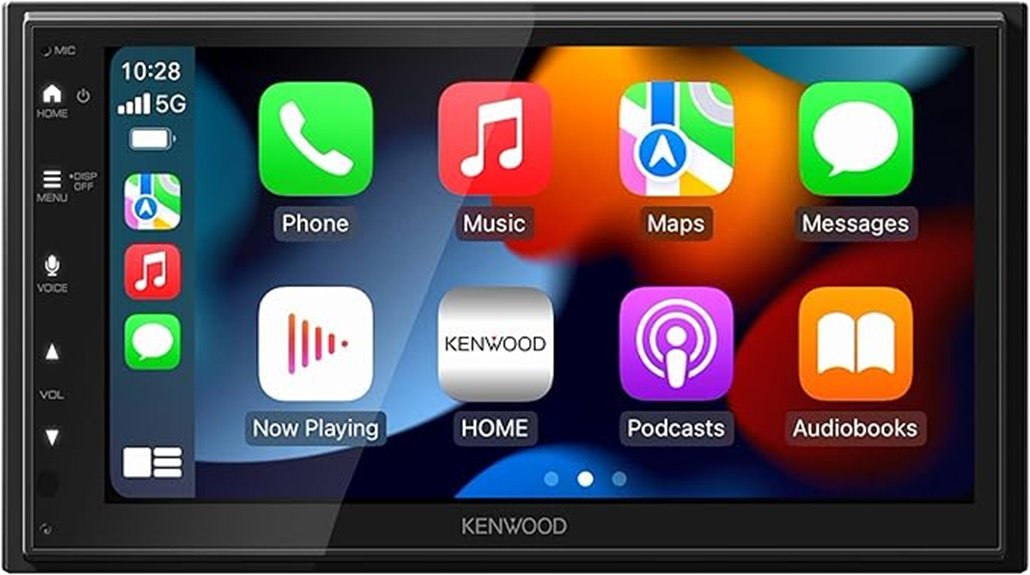
The KENWOOD DMX500S is an advanced multimedia receiver featuring a 6.8-inch capacitive touchscreen with a resolution of 1024×600. It offers a 13-band graphic EQ and digital time alignment for personalized sound experiences. Wireless integration with Apple CarPlay and Android Auto guarantees hands-free access, while built-in Bluetooth allows for seamless streaming. With a 200-watt amplifier delivering 50 watts per channel, this system is ideal for audio enthusiasts seeking customization and convenience. Explore its features further to understand its full capabilities.
Key Takeaways
- The KENWOOD DMX500S features a 6.8-inch capacitive touchscreen with a 1024×600 resolution for vibrant visuals and easy navigation.
- It offers advanced audio customization with a 13-band graphic EQ and digital time alignment for a personalized sound experience.
- Wireless integration through Apple CarPlay and Android Auto allows for seamless smartphone connectivity and hands-free control.
- The built-in 200-watt amplifier delivers excellent audio performance, providing 50 watts peak per channel for immersive listening.
- Installation is straightforward, fitting various dash openings with a compact double DIN design, ensuring easy upgrades to your multimedia system.
Key Features of the KENWOOD DMX500S
The KENWOOD DMX500S stands out as an innovative multimedia receiver, offering a blend of advanced technology and user-friendly features.
Its intuitive user interface, highlighted by a 6.8-inch capacitive touchscreen with a 1024×600 resolution, guarantees effortless navigation through its extensive multimedia capabilities. Users can enjoy seamless access to music, maps, and calls, enhancing their driving experience.
The receiver includes a 13-band graphic EQ and digital time alignment, allowing for personalized sound tailored to individual preferences.
Additionally, the dedicated input for backup cameras enhances safety, making the KENWOOD DMX500S a compelling choice for those seeking liberation in their audio and visual experience.
Connectivity Features of the KENWOOD DMX500S
Connectivity features of the KENWOOD DMX500S play a significant role in enhancing user experience by ensuring seamless interaction with various devices.
This multimedia system offers wireless integration through both Apple CarPlay and Android Auto, allowing users to access navigation, calls, and streaming effortlessly.
The built-in Bluetooth functionality supports Bluetooth pairing for hands-free calling and audio streaming, with dual phone pairing capability, enabling smooth shifts between devices.
The KENWOOD DMX500S features built-in Bluetooth for hands-free calling and audio streaming, supporting dual phone pairing for seamless device transitions.
This connectivity not only promotes convenience but also empowers users to stay connected while maintaining focus on the road.
Audio Performance of the KENWOOD DMX500S
Audio performance in the KENWOOD DMX500S is engineered to deliver an immersive listening experience, making it a notable choice for audio enthusiasts.
The device boasts impressive sound quality, supported by a built-in 200-watt amplifier, providing 50 watts peak per channel for clear audio without external equipment.
Users can enjoy extensive audio customization through a 13-band graphic EQ, digital time alignment, and advanced crossover settings, allowing for tailored sound profiles.
These features enhance the overall audio experience, enabling users to create their ideal soundscape.
Ultimately, the KENWOOD DMX500S stands out for those seeking freedom in their audio preferences.
Maximizing Control: Features for Convenience and Expandability
While exploring the KENWOOD DMX500S, it becomes clear that this device prioritizes convenience and expandability, enhancing the overall user experience.
The user-friendly interface allows for effortless navigation, while seamless integration with wireless Apple CarPlay and Android Auto empowers hands-free control for calls and navigation.
Additionally, Bluetooth functionality supports dual phone pairing, facilitating quick device switching.
Bluetooth functionality allows for seamless dual phone pairing, making device switching quick and effortless.
For those seeking enhanced safety, the unit is compatible with factory steering wheel controls, ensuring a smooth driving experience.
Moreover, the rear USB input enables device charging and connectivity, making the KENWOOD DMX500S a versatile choice for tech-savvy users.
Installing Your KENWOOD DMX500S: Tips and What to Expect
Installing the KENWOOD DMX500S is a straightforward process that can greatly enhance a vehicle’s multimedia capabilities.
To begin, gather essential installation tools such as a screwdriver, wire stripper, and crimping tool. Familiarize yourself with the wiring connections, ensuring each is secure for peak functionality.
The compact double DIN design allows for easy fitting in various dash openings, without compromising features. Following the provided instructions, connect the unit to power and ground wires, and incorporate factory steering wheel controls if desired.
Expect a seamless integration, enabling audio streaming and smartphone connectivity, transforming the driving experience into one of liberation and convenience.
Frequently Asked Questions
What Types of Devices Are Compatible With the KENWOOD DMX500S?
The Kenwood DMX500S is compatible with devices featuring Bluetooth connectivity and supports smartphone integration for both Apple and Android systems. This allows users to enjoy hands-free control and seamless access to their favorite applications.
Does the KENWOOD DMX500S Support Voice Commands for Navigation?
The Kenwood DMX500S supports voice command functionality, enhancing navigation features. Users can effortlessly control navigation through voice, promoting a hands-free experience that liberates drivers from distractions, allowing for safer and more focused journeys.
Can I Customize the Display Settings of the KENWOOD DMX500S?
The Kenwood DMX500S embraces user preferences with customizable display themes, allowing individuals to liberate their visual experience. Ironically, one can personalize settings while remaining tethered to technology, seamlessly blending aesthetics with functionality.
How Does the KENWOOD DMX500S Handle Phone Notifications?
The Kenwood DMX500S manages phone notifications through seamless phone integration, providing notification alerts via its high-resolution touchscreen. This functionality allows users to remain connected effortlessly while enjoying a liberated driving experience without distractions.
Is There a Warranty Available for the KENWOOD DMX500S?
The Kenwood DMX500S comes with warranty details that assure product longevity. This coverage reflects the manufacturer’s confidence in quality, allowing users to enjoy freedom from concerns about potential defects or performance issues during its usage.
Conclusion
To summarize, the KENWOOD DMX500S exemplifies modern multimedia technology, much like a well-tuned orchestra that harmonizes various elements into a cohesive experience. With its 6.8” high-resolution touchscreen, seamless smartphone integration, and customizable audio settings, it caters to diverse preferences while enhancing safety features. For those seeking a practical yet powerful upgrade to their vehicle’s entertainment system, the DMX500S stands out as an excellent choice, ensuring every drive is not just a journey, but an enjoyable adventure.