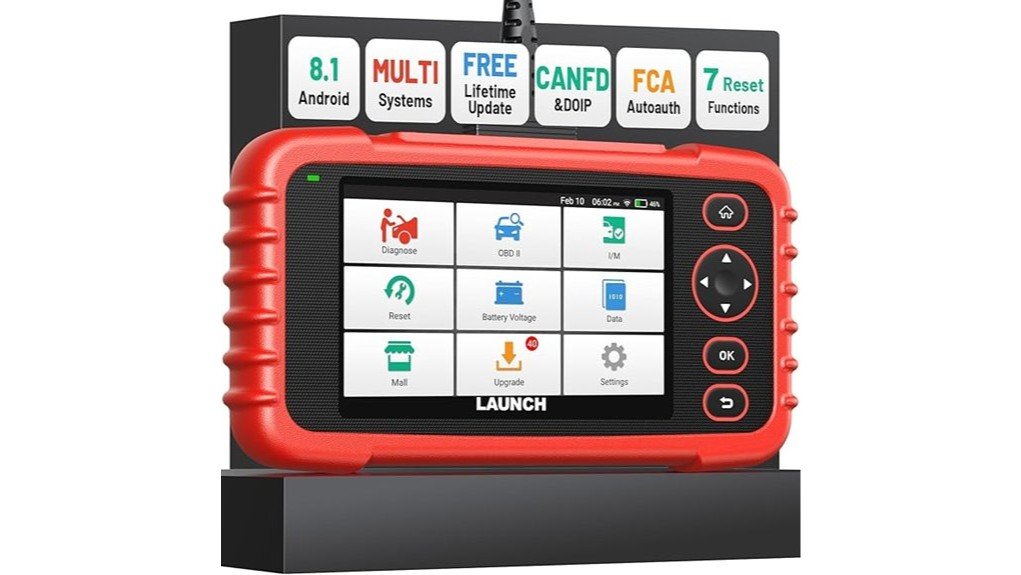
A basic code reader can tell you why the check engine light is on, but it may not reach the transmission, ABS, or airbag systems. The Launch OBD2 Scanner CRP123X V3.0 Elite adds four-system diagnostics, live data, maintenance services, and a touchscreen interface for drivers who need more detail. This review checks its listed features, compatibility limits, setup needs, and value. Its broad coverage is useful, but some functions depend on your exact vehicle and certain newer-protocol or battery-testing jobs need separate hardware.
Quick Verdict
Rating: 8.5/10, recommended with compatibility checks
Best For: DIY owners, automotive enthusiasts, mobile mechanics, and small shops that need four-system diagnostics across several vehicle brands
Bottom Line: The CRP123X V3.0 Elite offers more diagnostic depth than a basic engine-code reader, with live data, seven listed service functions, AutoVIN, and Wi-Fi updates. Its main tradeoff is that vehicle coverage varies, while CAN-FD, DoIP, battery testing, and TPMS work may require separate accessories.
Key Specifications
| Specification | Detail |
|---|---|
| Brand | LAUNCH |
| Model | CRP123X V3.0 Elite, model number CRP123X |
| Product type | Handheld automotive diagnostic scan tool |
| Main diagnostic systems | Engine, transmission, ABS, and SRS |
| OBD2 functions | All 10 standard OBD2 test modes are listed for compatible vehicles |
| Vehicle coverage | 90+ brands and 1996+ OBDII vehicles, with coverage varying by make, model, year, engine, and control module |
| Display | 5-inch touchscreen with listed 720P resolution |
| Operating system | Android 8.1 |
| Memory | 2GB RAM and 64GB storage on the current V3.0 listing |
| Battery | Rechargeable battery listed as 6100mAh in the detailed 2026 configuration section |
| Wireless connection | Dual-band 2.4GHz and 5GHz Wi-Fi for updates and online features |
| Charging | USB Type-C charging port and vehicle DLC power support |
| Newer-vehicle support | FCA AutoAuth support plus CAN-FD and DoIP capability; adapters may be required |
| Listed service functions | Oil reset, throttle adaptation, SAS reset, ABS bleeding/service, BMS reset, brake or EPB reset, and DPF regeneration, depending on vehicle support |
| Dimensions | 11.02 x 9.06 x 3.54 inches |
| Listed weight | 1.2 pounds |
| Included components | Main unit and OBD cable; check the seller page for current package contents or promotional extras |
| Amazon ASIN | B07RLF8FBC |
What Is the Launch OBD2 Scanner CRP123X V3.0 Elite?
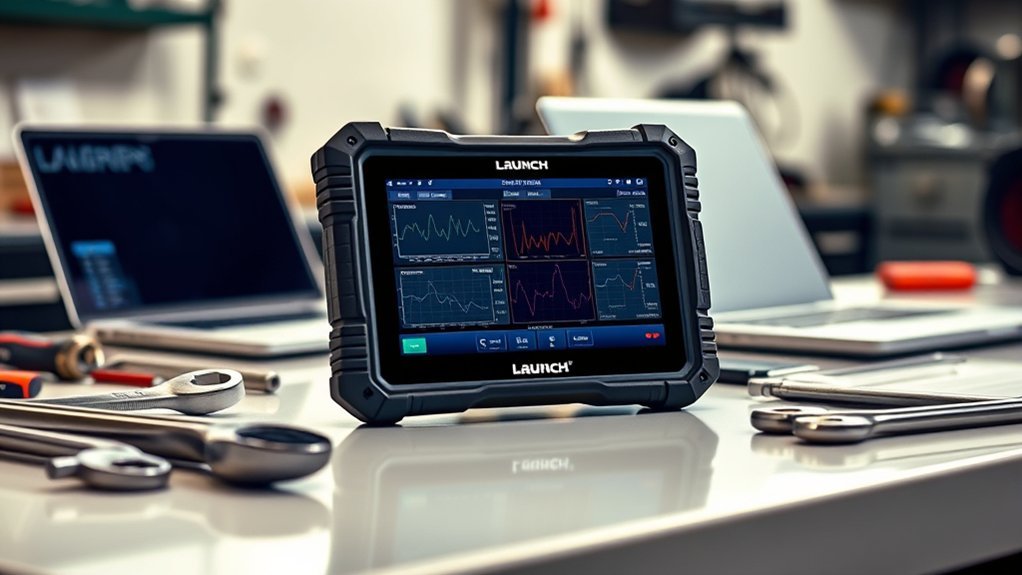
The LAUNCH CRP123X V3.0 Elite is a portable scan tool that connects to your vehicle’s OBD2 diagnostic port. It reads and clears supported trouble codes, displays live sensor data, and checks four major systems: engine, transmission, ABS, and SRS.
It sits above a basic code reader but below a full professional bidirectional scanner. You get a 5-inch touchscreen, AutoVIN identification, Wi-Fi updates, graphing, diagnostic reports, and several maintenance services without carrying a laptop. The main value is wider system access across many vehicle brands, not dealer-level control of every module.
Who Should Buy It?
Best For
- DIY owners who need engine, transmission, ABS, and airbag diagnostics
- Families or enthusiasts who maintain several OBD2 vehicles from different brands
- Mobile mechanics and small shops that need live data, reports, and common service resets
Skip If
- You only need to read and clear a basic check engine code
- You need full-system bidirectional tests, ECU coding, or programming
- You expect battery testing, TPMS programming, CAN-FD, or DoIP access with every accessory included
Before You Buy: Send the seller or manufacturer your VIN and the exact function you need. The listing states that menus vary by vehicle, AutoVIN may not identify every model, and CAN-FD, DoIP, battery testing, and TPMS work can require separate adapters or modules.
Four-System Diagnostics and OBD2 Coverage
The CRP123X V3.0 Elite can access the engine, automatic transmission, anti-lock brake, and supplemental restraint systems on compatible vehicles. Within supported modules, you can read and clear codes, view live data, and review freeze-frame information. This is the key upgrade over low-cost readers that only reach generic powertrain codes.
The listing also states support for all 10 standard OBD2 test modes on compatible 1996 and newer vehicles. These modes can include current and pending codes, readiness monitors, live data, freeze-frame data, oxygen-sensor tests, onboard monitor tests, vehicle information, and permanent codes. Exact access still depends on the vehicle’s emissions standard and control-module support.
Do not treat a cleared code as a completed repair. Record the code, freeze-frame data, and symptoms first. Clearing the warning light erases useful clues and may reset emissions readiness monitors.
Seven Listed Service Functions
The current V3.0 listing describes seven maintenance functions: oil reset, throttle adaptation, steering-angle sensor reset, ABS bleeding or service, battery-management reset, brake or electronic parking-brake reset, and diesel particulate filter regeneration. These can save time after routine maintenance when your vehicle supports the required menu.
Coverage is not universal. A scanner may read ABS codes on a vehicle but still lack ABS bleeding for that same model. DPF regeneration applies only to supported diesel vehicles, while BMS reset is useful only when the vehicle requires battery registration or battery-monitor relearning.
The scanner also includes an online store for optional software or added functions. Some paid features have restrictions, so check the included service list instead of assuming every menu is free for every brand.
CAN-FD, DoIP, and FCA AutoAuth Support
CAN-FD and DoIP support can help the scanner communicate with newer diagnostic networks used by some recent vehicles. The important limitation is that the product page says adapters may be needed. Check whether the adapter for your vehicle is included, sold separately, or not required for your model.
FCA AutoAuth support is aimed at newer Chrysler, Dodge, Jeep, Ram, Fiat, and related vehicles protected by a security gateway. You may need an AutoAuth account and an internet connection before the scanner can perform protected functions. Account approval, vehicle coverage, and available actions can change.
This support improves newer-vehicle usefulness, but it does not guarantee coding or active tests.
Display, Controls, Battery, and Storage
The 5-inch touchscreen is large enough for menu navigation and basic graph viewing while keeping the unit portable. The current V3.0 page lists Android 8.1, 2GB RAM, and 64GB storage. That storage is useful for vehicle software, saved reports, recorded data, and future updates.
Dual-band Wi-Fi supports both 2.4GHz and 5GHz networks for software downloads and online features. A Type-C charging port is more convenient than older micro-USB designs, while the OBD cable can power the scanner during a vehicle session.
The detailed configuration section lists a 6100mAh battery, although another short bullet on the same product page refers to 6000mAh. That small listing conflict should not change the buying decision, but you should confirm the current hardware revision if exact battery capacity matters to you.
Live Data, Graphing, and Diagnostic Reports
Live data can show how a sensor or system behaves while the engine runs. The scanner can display values as text and combine up to four data streams in graph form. This makes it easier to compare related readings such as engine speed, fuel trim, coolant temperature, or voltage when the vehicle exposes those data points.
Record-and-playback support lets you review a changing value after a road test instead of watching the screen while driving. Diagnostic reports can be saved, shared, printed through a compatible computer setup, or discussed with a technician. These tools help you document a fault before buying parts.
The built-in code library explains many faults, but a code identifies the affected system, not always the failed part.
Setup and Compatibility Tips
- Update the scanner first: Connect it to stable Wi-Fi and install available software before diagnosing a newer vehicle.
- Check battery voltage: Low vehicle voltage can cause communication errors. Use a proper charger or maintainer when a long service procedure requires it.
- Try AutoVIN, then manual selection: If automatic identification fails, enter the VIN or select the make, model, year, and engine manually.
- Save the first scan: Keep the original codes, freeze-frame data, and report before clearing anything.
- Confirm the service menu: Reading a module does not guarantee every reset, bleed, relearn, or regeneration function.
- Follow the vehicle service procedure: ABS bleeding, DPF regeneration, electronic parking-brake service, and battery registration can have model-specific safety steps.
Pro Tip: Before clearing a code, take a photo of the warning lights and save the scanner report. You will have a baseline if the fault returns or you need help from a repair shop.
How It Performs in Real Use
For a Check Engine Light
The tool can read generic OBD2 codes, show freeze-frame data, and stream related sensor values. This gives you more context than a code alone and can help you decide whether the vehicle needs immediate service. It cannot confirm a failed component without proper testing.
For ABS, Airbag, or Transmission Warnings
Four-system access is the strongest reason to choose this model over a basic reader. You can scan supported ABS, SRS, and transmission modules, save the report, and see whether a warning is tied to a stored fault. Safety-system repairs should still follow the factory procedure, and airbag work may require a trained technician.
For Routine Maintenance
The seven listed service functions can help after an oil change, brake job, battery replacement, throttle cleaning, or other supported maintenance. The benefit depends on exact vehicle coverage, so confirm the menu before relying on the scanner for a scheduled job.
For a Multi-Vehicle Garage or Small Shop
Support for 90+ brands, Wi-Fi updates, 64GB storage, and saved reports makes the scanner practical when you work on several makes. It is still a four-system tool, so a shop that needs all-module scans, active tests, ECU coding, or programming should compare a higher-tier model.
Compatibility and Safety
Use the CRP123X only with supported 12-volt passenger vehicles that have a standard OBD2 diagnostic connector. Keep the cable away from pedals, moving engine parts, hot surfaces, and the steering wheel. Do not hold or operate the scanner while driving.
Some service functions can command vehicle components or require the engine to run. Follow the scanner prompts and the vehicle service manual. Use wheel chocks, ventilation, protective equipment, and a stable battery supply when the procedure calls for them.
A diagnostic scanner does not replace a mechanical inspection. Stop driving and seek professional help when you have brake failure, steering problems, overheating, oil-pressure warnings, fuel leaks, smoke, or an active airbag-system concern.
Pros and Cons
Pros
- Reaches engine, transmission, ABS, and SRS systems on compatible vehicles
- Lists seven useful maintenance and reset functions
- 5-inch touchscreen, AutoVIN, live graphs, recording, and report tools improve usability
- 2GB RAM, 64GB storage, Type-C charging, and dual-band Wi-Fi suit regular use
- CAN-FD, DoIP, and FCA AutoAuth support expand newer-vehicle potential
Cons
- Diagnostic and service coverage varies by make, model, year, and control module
- CAN-FD, DoIP, battery testing, and TPMS functions may need separate accessories
- It is not a full all-system bidirectional, coding, or programming scanner
Is It Worth the Price?
The CRP123X V3.0 Elite sits in the mid-range diagnostic-tool category. It offers stronger value than a basic reader when you regularly need ABS, SRS, transmission, live-data, or maintenance access. A household with several vehicles or a small repair business is more likely to use enough of its functions to justify the cost.
It is less compelling when your only goal is clearing an occasional engine code. You should also include the cost of any required CAN-FD, DoIP, battery-test, or TPMS accessory in your comparison.
The update policy is a major value point because the listing promotes lifetime Wi-Fi software updates. Seller terms and optional paid functions can change, so review the current update, warranty, and MALL terms before purchase.
How It Compares to Alternatives
The Foxwell NT604 Elite is worth comparing when you want a simpler four-system scanner and do not need the CRP123X touchscreen or wider service list. The Innova 5610 may appeal to buyers who prefer repair guidance and a familiar handheld format.
The Autel MaxiCOM MK808 series is a higher-tier option for buyers who need broader all-system diagnostics, more service functions, and active tests. The LAUNCH CRP123X V3.0 Elite makes the most sense when four-system access, live data, seven listed services, and multi-brand coverage meet your needs without paying for a full professional platform.
Frequently Asked Questions
What vehicles does the Launch CRP123X V3.0 Elite support?
The listing states coverage for 90+ brands and many 1996 and newer OBDII vehicles. Exact engine, transmission, ABS, SRS, reset, and protocol access varies, so confirm your VIN and required function before buying.
Can it diagnose ABS, airbag, and transmission faults?
Yes, those are three of its four listed diagnostic systems, along with the engine. Available codes, data, and functions depend on the vehicle’s control modules and software coverage.
Which reset and maintenance functions are included?
The current V3.0 page lists oil reset, throttle adaptation, SAS reset, ABS bleeding or service, BMS reset, brake or EPB reset, and DPF regeneration. A listed service may not appear on every supported vehicle.
Does it support CAN-FD and DoIP vehicles?
The listing describes CAN-FD and DoIP capability for supported newer vehicles. It also says adapters may be required, so check the vehicle and package before assuming direct access.
Can the CRP123X test a car battery?
Battery-management reset may be available on compatible vehicles, but dedicated battery testing uses the optional LAUNCH BST360 module according to the product page. The BST360 is not listed as a standard included component.
Does it require a subscription for updates?
The current listing promotes lifetime free Wi-Fi software updates. Optional software and paid MALL functions can have separate limits, so read the current seller terms before ordering.
What should you do if AutoVIN fails?
Enter the VIN manually or select the vehicle make, model, year, and engine from the diagnostic menu. AutoVIN is a convenience feature and does not identify every compatible vehicle.
Is this a bidirectional or programming scanner?
It is mainly a four-system diagnostic and service-reset tool. Do not buy it expecting full all-module active tests, ECU coding, key programming, or dealer-level programming unless the current compatibility information clearly confirms the exact task.
The Bottom Line
The LAUNCH CRP123X V3.0 Elite is a good fit when you need more than engine-code reading but do not need a full professional scan platform. Its strongest points are four-system diagnostics, live-data tools, seven listed service functions, and wide multi-brand coverage; its main limits are vehicle-specific support and the need for separate accessories for some advanced tasks.
Choose it after confirming your VIN and required function. Skip it for simple code clearing or move to a higher-tier scanner when you need all-system active tests, coding, or programming.
Ready to Buy?
Check the latest package details, compatibility, update terms, and price before you decide.