Disclosure: As an Amazon Associate, we earn from qualifying purchases. If you click a link on this page and make a purchase, we may receive a small commission at no extra cost to you.
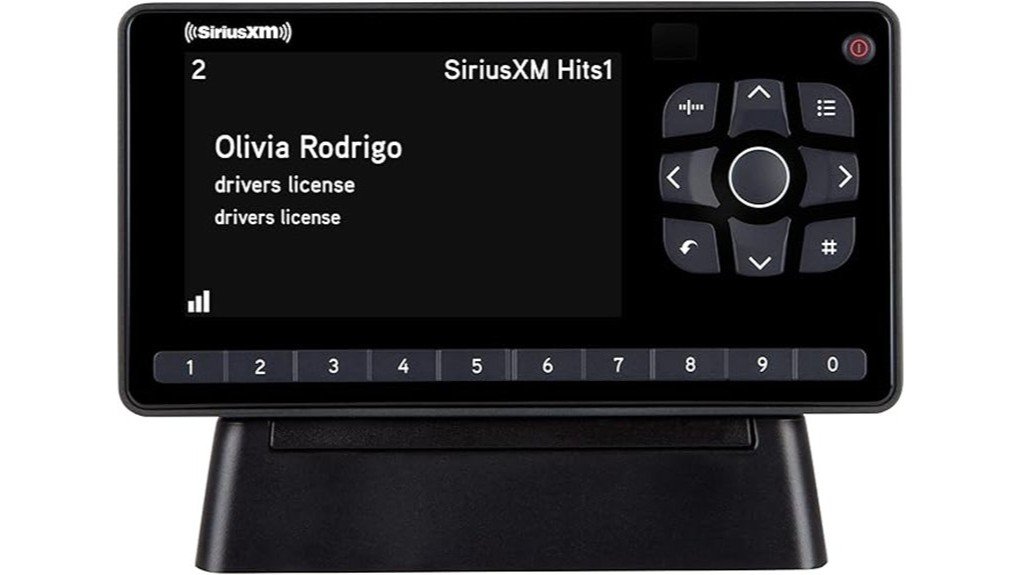
Adding SiriusXM to a home stereo can be awkward when you do not want to depend on a phone, app, or built-in car receiver. The SiriusXM SXEZR1H1 Onyx EZR with Home Kit gives you a dedicated dock-and-play radio, a 3.2-inch display, a remote control, and the cables needed for many home audio systems. Its strongest points are simple channel access, 10 presets, TuneMix, and an antenna that can be placed indoors or outdoors. Its main tradeoffs are the required SiriusXM subscription, no built-in Bluetooth, and the need for a separate vehicle kit if you also want to use the radio in a car.
Quick Verdict
Rating: 8/10, recommended with caveats
Best For: SiriusXM listeners who want a straightforward home receiver for a stereo system or powered speakers.
Bottom Line: The Onyx EZR Home Kit is easy to control, includes the main home-installation parts, and gives you quick access to favorite channels. It is less suitable if you want Bluetooth, app-first listening, or a complete home-and-car package in one box.
Key Takeaways
- The SXEZR1H1 package is the Onyx EZR with Home Kit, not a complete vehicle-and-home bundle.
- The receiver measures 5.0 x 2.7 x 0.72 inches and weighs 3.9 ounces.
- The 3.2-inch high-resolution display supports split-screen browsing and two contrast modes.
- You can save up to 10 favorite channels, use One-Touch Jump, and blend selected music channels with TuneMix.
- The box includes a home dock, remote, indoor/outdoor antenna, power adapter, and stereo audio cable.
- A SiriusXM subscription is sold separately, and the radio does not include built-in Bluetooth.
Essential Information About the Onyx EZR
The Onyx EZR is a small dock-and-play satellite radio receiver made for SiriusXM programming. The SXEZR1H1 bundle is set up for home use, so you receive the home dock and home-installation accessories rather than a vehicle dock, dash mount, or vehicle power adapter.
The Onyx EZR Home Kit is best viewed as a dedicated SiriusXM source for an existing stereo or powered speaker system.
The receiver is compact at 5.0 inches wide, 2.7 inches high, and 0.72 inches deep. It weighs 3.9 ounces, while the separate home dock measures 4.1 x 1.8 x 1.7 inches. This makes the radio easy to place on a shelf, desk, media cabinet, or kitchen counter, provided the antenna cable can reach a good signal location.
| Specification | Detail |
|---|---|
| Brand | SiriusXM |
| Model | SXEZR1H1 Onyx EZR with Home Kit |
| Product type | Dock-and-play satellite radio receiver |
| Receiver dimensions | 5.0 x 2.7 x 0.72 inches |
| Receiver weight | 3.9 oz (111 g) |
| Home dock | 4.1 x 1.8 x 1.7 inches, 1.9 oz |
| Display | 3.2-inch high-resolution screen with split-screen mode |
| Display options | White text on black or black text on white |
| Favorite channels | Up to 10 presets |
| Listening features | TuneMix, One-Touch Jump, channel browsing, parental controls |
| Home audio connection | 3.5 mm stereo output to left/right RCA cable |
| Audio cable length | 5.9 ft (180 cm) |
| Antenna | Indoor/outdoor home antenna with 20 ft cable |
| Power | Home AC adapter included |
| Remote | Included, uses one CR2032 battery |
| Bluetooth | Not built into this radio or home kit |
| Vehicle use | Requires a compatible vehicle kit or dock, sold separately |
| Subscription | Sold separately; programming varies by plan |
| Warranty | 90-day limited warranty for the original retail purchaser |
What Is the SiriusXM Onyx EZR?
The SiriusXM Onyx EZR SXEZR1H1 is a dedicated satellite radio receiver packaged with the parts needed to connect it to many home stereos and powered speakers. It receives SiriusXM programming through the included indoor/outdoor antenna and sends audio to your sound system through the home dock and stereo cable.
The receiver is designed around physical controls rather than a touchscreen or phone app. You can browse channels by category, enter a channel number directly, save 10 presets, return to your previous channel with One-Touch Jump, and lock channels with mature content.
Because the radio can move between compatible docks, you can expand the setup later. A vehicle dock-and-play kit or portable speaker dock is separate, so include that extra hardware in your buying decision if you plan to listen away from your home stereo.
Who Should Buy It?
Best For
- You want SiriusXM through an existing home stereo or powered speakers.
- You prefer physical buttons, a remote, and preset channels instead of app-only controls.
- You may add another compatible dock later and move one receiver between locations.
Skip If
- You need Bluetooth built into the receiver.
- You want a complete vehicle installation kit in the same box.
- You do not want an ongoing SiriusXM subscription or antenna-based setup.
Before You Buy: SXEZR1H1 is the home-kit version. It includes a home dock and home antenna, but vehicle power, mounting hardware, and a vehicle antenna require a separate compatible vehicle kit.
Top Features of the SiriusXM Onyx EZR
3.2-Inch Display and Physical Controls
The 3.2-inch high-resolution display shows the channel, artist or show name, song or program title, and other available information. Split-screen mode lets you see what is playing on favorite channels while you continue listening to the current one.
You can choose white text on a black background or black text on a white background. This is useful when room lighting or viewing angle makes one mode easier to read. The included remote also lets you control the receiver from across the room.
Favorites, TuneMix, and One-Touch Jump
The Onyx EZR stores up to 10 favorite channels on its numbered buttons. This is enough for a focused mix of music, news, sports, comedy, and talk without forcing you to browse the full channel list each time.
TuneMix creates a blended music channel from selected favorites. One-Touch Jump returns you to the previous channel, which is useful when you switch away briefly and want to get back without remembering the channel number.
Audio Connection and Sound Quality
The home dock connects to many stereos through the included 3.5 mm-to-RCA cable. The receiver supplies the SiriusXM audio signal, while your amplifier and speakers determine the final loudness, bass response, clarity, and room coverage.
This package does not include speakers. Confirm that your stereo or powered speaker system has compatible left/right RCA inputs or another input that can accept the supplied cable. You may need a different cable or adapter for systems that only offer a 3.5 mm input.
Antenna and Reception
The included indoor/outdoor antenna has a 20-foot cable, which gives you more freedom to reach a window or outdoor mounting point. Reception depends on location, nearby buildings, trees, window materials, and antenna direction.
The manual recommends testing indoor locations first and checking the signal indicator before mounting the antenna. A window with a clearer view toward the southern sky often works better in the continental United States, but local terrestrial repeaters can also affect reception.
Pro Tip: Test the radio, audio cable, and antenna in temporary positions before hiding cables or mounting anything. Small antenna movements can change signal strength, and the 20-foot cable is easier to route once you know the best location.
Step-by-Step Setup and Activation Guide
- Choose the dock location: Place it near your stereo or powered speakers, within reach of a wall outlet and the antenna cable. Avoid prolonged direct sunlight on the display.
- Connect the antenna: Plug the antenna cable into the silver ANT connection on the back of the home dock.
- Connect power: Attach the home power adapter to the red power connection and plug it into an outlet.
- Dock the receiver: Seat the Onyx EZR in the home dock and turn it on.
- Check the signal: Move and aim the antenna until the receiver shows a stable satellite or terrestrial signal.
- Connect your sound system: Use the included stereo cable between the dock and your stereo or powered speakers, then select the correct input on your audio system.
- Activate the radio: Find the Radio ID in the receiver menu and follow the current SiriusXM activation process. Subscription and activation terms may change, so review them before confirming service.
Setup Tips Before First Use
- Check your input type: The included cable ends in left and right RCA plugs for the audio system.
- Use the signal screen: Do not judge antenna placement only by whether audio starts. Check the receiver’s signal indicator for a more stable location.
- Protect the antenna cable: Avoid sharp bends, pinching, twisting, and rough openings that can damage it.
- Set presets after activation: Listen for a few days before filling all 10 buttons, so your saved list reflects the channels you actually use.
- Adjust audio levels carefully: Start with moderate volume on both the receiver and your stereo, then increase gradually to avoid distortion.
How It Performs in Real Use
With a Home Stereo
This is the intended use for the SXEZR1H1 package. The home dock stays connected to power, antenna, and audio, while the receiver remains easy to remove. The remote is useful when the dock sits across the room or inside an open media cabinet.
With Powered Speakers
The Onyx EZR can work with powered speakers that accept the supplied audio connection or a suitable adapter. This creates a smaller setup than a full receiver-and-speaker system, but you still need an outlet for the dock and another power source for the speakers.
In a Second Room or Another Location
You can move the receiver between compatible SiriusXM docks, but each location needs its own dock, power, antenna, and audio solution. This can be practical for a home office, workshop, seasonal property, or portable speaker dock, yet the extra hardware adds cost.
In a Vehicle
The receiver can be used in a compatible vehicle dock, but this home package does not include the vehicle antenna, power adapter, mounts, or vehicle dock. A separate vehicle kit is the cleaner choice if you want reliable car use rather than trying to adapt the home accessories.
Compatibility and Safety
Use the included power adapter and approved compatible accessories. Keep the radio and dock away from water, moisture, excessive dust, and prolonged direct sunlight. The manual lists an operating range of -4°F to 140°F, but indoor placement away from extreme heat and cold is still the safer choice.
Clean the receiver with a soft, damp cloth. Do not use liquid or aerosol cleaners, and do not open or repair the case yourself. Route the antenna and audio cables where they will not be pinched, tripped over, or pulled from the dock.
The remote uses a CR2032 coin-cell battery in a child-resistant compartment. Keep loose and replacement coin batteries away from children and pets, and reinstall the battery cover securely.
Customer Ratings and Feedback
At the time of this review, the Amazon listing showed a 4.3 out of 5-star rating from 1,292 customer ratings. That total can change as new buyers leave feedback, so treat it as a snapshot rather than a fixed product specification.
Positive comments commonly focus on easy setup, straightforward controls, the display, and access to SiriusXM programming through a home audio system. Lower ratings often reflect subscription expectations, antenna-placement problems, or buyers expecting newer wireless features.
Pros and Cons
Pros
- Compact 5.0-inch-wide receiver is easy to place near a home audio system.
- 3.2-inch display supports split-screen browsing and two contrast modes.
- Includes home dock, remote, antenna, power adapter, and stereo cable.
- Stores 10 favorites and adds TuneMix plus One-Touch Jump.
- Twenty-foot antenna cable gives you useful placement flexibility.
Cons
- No built-in Bluetooth or app-based control.
- Vehicle use requires a separate compatible vehicle kit.
- Reception may require trial-and-error antenna placement, and service requires an ongoing subscription.
Is It Worth the Price?
The Onyx EZR Home Kit offers strong value when you already own a compatible stereo or powered speakers and specifically want SiriusXM without relying on a phone. The included dock, remote, antenna, power adapter, and audio cable cover the main parts of a home installation.
The long-term cost is not only the receiver. You also need an active subscription, and you may need extra docks or a separate vehicle kit for other locations. It is worth considering if dedicated satellite-radio controls and favorite-channel access matter more to you than Bluetooth or on-demand app features.
How It Compares to Alternatives
The SiriusXM Roady BT is a better comparison if Bluetooth vehicle audio is your priority. The SiriusXM Tour with 360L is aimed at buyers who want a more modern color interface and connected features, while the Onyx Plus is worth comparing if pause, rewind, and replay functions matter to you.
The Onyx EZR makes the most sense when you want a simpler home receiver with a readable screen, 10 presets, TuneMix, and a remote. It is less advanced than those alternatives, but its basic controls may be easier for everyday radio listening.
Frequently Asked Questions
Can I use the Onyx EZR SXEZR1H1 in my car?
Yes, the receiver can work with a compatible vehicle dock-and-play kit. The SXEZR1H1 box is the home version, so the vehicle dock, magnetic antenna, mounting hardware, and vehicle power adapter are not included.
Does the Onyx EZR have Bluetooth?
No, Bluetooth is not built into this receiver or home kit. It sends audio through the wired home-dock connection, so choose a different SiriusXM receiver or compatible accessory if wireless audio is essential.
What comes in the Onyx EZR Home Kit?
The package includes the Onyx EZR receiver, home dock, indoor/outdoor home antenna, home power adapter, stereo audio cable, and remote control. It does not include speakers or vehicle-installation parts.
Will it connect to any home stereo?
It works directly with systems that accept the included left/right RCA audio plugs. A system with only a 3.5 mm input may work with a different cable, while a digital-only system may need a separate converter.
Where should I place the home antenna?
Start near a window and use the receiver’s signal indicator while testing different positions. In the continental United States, a clearer view toward the southern sky often helps, but buildings, trees, screens, and coated glass can affect reception.
How do I reset the Onyx EZR to factory settings?
Press Menu, open Factory Settings, select Restore Defaults, and confirm. This permanently removes personal settings such as saved favorite channels and other preferences.
Does the radio work without a SiriusXM subscription?
You need an active SiriusXM subscription to receive your selected programming package. Promotional offers, channel lineups, activation fees, and plan names can change, so review the current terms before activating.
What warranty comes with the Onyx EZR?
SiriusXM lists a 90-day limited warranty for defects in materials and workmanship for the original retail purchaser. Coverage exclusions apply, so keep your proof of purchase and read the warranty terms supplied with the product.
The Bottom Line
The SiriusXM Onyx EZR SXEZR1H1 is a good fit if you want a compact, easy-to-control satellite radio for an existing home stereo or powered speakers. Its 3.2-inch display, remote, presets, TuneMix, and complete home dock package are useful strengths, while the lack of built-in Bluetooth and separate vehicle-kit requirement are the main limitations.
Buy it for dedicated home SiriusXM listening with physical controls. Skip it if you want wireless streaming, app-first features, or home and vehicle hardware in one package.
Ready to Buy?
Check the latest price, seller details, and subscription terms before you decide.