Disclosure: As an Amazon Associate, we earn from qualifying purchases. If you click a link on this page and make a purchase, we may receive a small commission at no extra cost to you.
Methodology: We checked the live Amazon listing for ASIN B0CLZ5DDPS, compared the model information with Scosche product and installation documentation, reviewed compatibility notes, and corrected claims about OnStar, Bose systems, steering wheel controls, warning chimes, and installation.
Replacing the factory radio in an older GM vehicle is not always a simple plug swap. The original radio may handle warning chimes, retained accessory power, steering wheel buttons, and data signals that a basic harness cannot preserve. The Scosche GM2K-WP is designed to bridge that gap for select GM vehicles, but fit depends on your exact year, model, audio package, and aftermarket stereo. This review explains what the interface retains, where its compatibility stops, and what you should confirm before ordering.
Scosche GM2K-WP Review
Quick Verdict
Rating: 8/10
Best For: Owners of compatible GM vehicles who want an aftermarket stereo while retaining steering wheel audio controls, safety chimes, and data-driven accessory power.
Bottom Line: The GM2K-WP provides a cleaner, vehicle-aware installation than a basic wiring harness. Its main tradeoff is strict compatibility, especially because it does not retain OnStar and is not intended for Digital Premium Bose systems.
| Specification | Detail |
|---|---|
| Brand | Scosche |
| Amazon Model | GM2K-WP |
| Documentation Name | GM2000SW / GM2000SW-WM1 |
| ASIN | B0CLZ5DDPS |
| UPC | 033991087903 |
| Product Type | Factory stereo replacement interface for a GM Class II data system |
| Compatibility | Select 2000-2013 GM vehicles; exact year, model, trim, radio, and option package must match the Fit Guide |
| Retained Functions | Compatible steering wheel audio controls, safety and warning chimes, retained accessory power, and vehicle data status |
| Amplified Systems | Supports certain factory-amplified systems; not intended for Digital Premium Bose systems |
| OnStar | Not retained; OnStar is disabled after installation |
| Steering Wheel Input | 3.5 mm plug or wired Key 1, Key 2, and ground connection, depending on the aftermarket stereo |
| Accessory Output | Data-driven +12V retained accessory power output; the manual limits the red output lead to 5 amps for one aftermarket stereo |
| Material | Acrylonitrile butadiene styrene, ABS |
| Listed Weight | 0.15 kilograms |
| Listed Wire Diameter | 1.02 millimeters |
| Included Component | Factory stereo replacement interface assembly; verify the current package contents before ordering |
| Support | Limited lifetime warranty and lifetime technical support listed by Scosche |
Key Takeaways
- The Scosche GM2K-WP is a vehicle-data interface, not a universal GM wiring harness.
- It can retain factory warning chimes, retained accessory power, and compatible steering wheel audio controls.
- Your aftermarket head unit must support steering wheel controls and provide any Bluetooth, Apple CarPlay, Android Auto, or touchscreen features.
- The interface does not retain OnStar and should not be used with Digital Premium Bose systems unless Scosche confirms a supported installation path.
- You may still need a dash kit, antenna adapter, wiring connectors, and vehicle-specific removal tools.
Before You Buy: Do not rely on the broad “select 2000-2013 GM” description alone. Check the Fit Guide, identify whether your vehicle has OnStar or Premium Bose, and confirm that your new stereo accepts the GM2K-WP steering wheel control connection.
What Is the Scosche GM2K-WP?
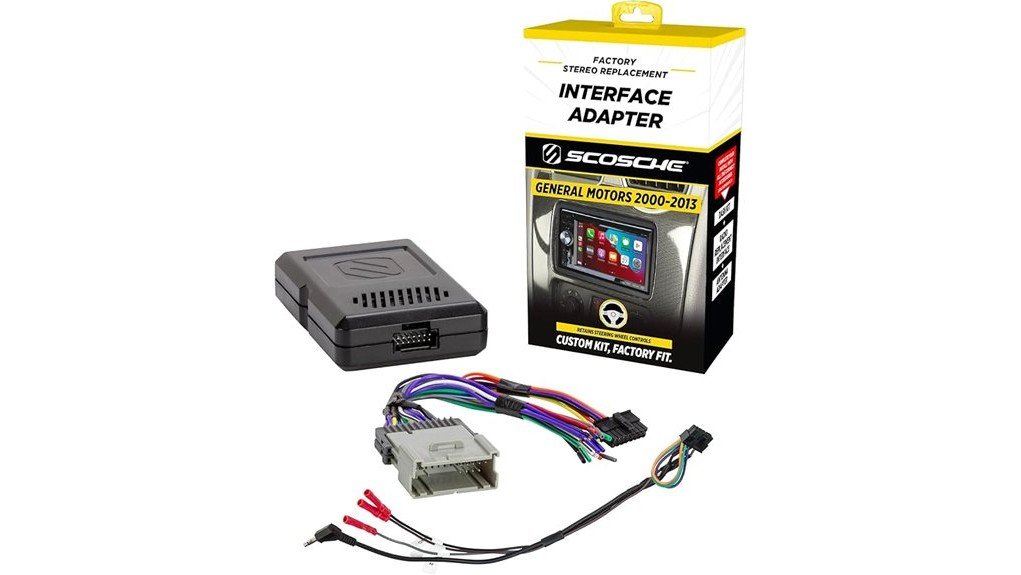
The Scosche GM2K-WP is a factory radio replacement interface for compatible GM vehicles that use a Class II data system. Amazon lists the model as GM2K-WP, while Scosche installation material may refer to the related unit as GM2000SW or GM2000SW-WM1. The product sits between the factory radio connector and your aftermarket head unit.
Its purpose is broader than joining power and speaker wires. In supported vehicles, the module recreates warning chimes through its internal speaker, provides a switched accessory output, retains compatible steering wheel audio controls, and sends a healthy-radio status to the vehicle electronics. Those functions help prevent the common problems that appear when a data-connected factory radio is removed with only a basic harness.
The interface does not replace the head unit, dash kit, antenna adapter, or amplifier. It also does not create Bluetooth, navigation, Apple CarPlay, Android Auto, or a touchscreen. Those features must come from the stereo you install.
Who Should Buy It?
Best For
- Owners of a Fit Guide-listed GM vehicle who want to keep factory warning chimes after replacing the radio.
- Drivers with compatible steering wheel audio buttons and an aftermarket stereo that accepts a wired control input.
- Installers who need a data-driven accessory output instead of searching for a switched-power source elsewhere in the dash.
Skip If
- You need to retain OnStar, factory Bluetooth, or advanced vehicle-data outputs.
- Your vehicle has a Digital Premium Bose system or another audio package excluded by the Fit Guide.
- Your year, model, trim, or radio connector does not appear in the current compatibility information.
Feature-by-Feature Review
Fit and Vehicle Compatibility
Compatibility is the most important part of this purchase. The listing covers select GM vehicles across a broad year range, but the interface does not fit every Chevrolet, GMC, Buick, Cadillac, Pontiac, Saturn, Hummer, Isuzu, or Oldsmobile from those years. Even two vehicles with the same model year can use different factory radios or amplified systems.
Check the vehicle application information, then look for option-package notes. Premium Bose identification may require checking the service-parts label for RPO codes such as Y91, Y92, or Z75. A center-channel speaker in the dashboard can also indicate a premium system, but the vehicle label and Scosche Fit Guide are the better references.
Warning Chimes and Retained Accessory Power
The factory radio can be part of the vehicle’s warning system. The GM2K-WP is designed to retain chimes such as seatbelt, key-in-ignition, lights-on, low-fuel, service reminders, and park-assist alerts when those functions are present in the vehicle. The chimes play through a speaker inside the interface module rather than through the removed factory radio.
The module also supplies a data-driven +12V switched accessory output and supports retained accessory power. That means the aftermarket radio can continue operating for the normal RAP period until the vehicle conditions turn it off. The manual rates the red accessory lead at 5 amps maximum and limits it to a single aftermarket stereo, so it should not power extra accessories.
Steering Wheel Control Retention
The GM2K-WP can retain steering wheel audio buttons when the vehicle has them and the new stereo supports a compatible control input. Depending on the radio brand, the connection may use the included 3.5 mm plug or wired Key 1, Key 2, and ground leads. Some stereo brands also require the installer to configure or cut specific loops on the control harness.
Button behavior can differ by vehicle and stereo. Volume, track, source, preset, mute, or voice buttons may be available, but you should not assume every factory button will keep its original function. Test all controls before reinstalling the dash trim.
Factory Amplifier and Bose Limitations
Scosche states that the interface works with certain factory-amplified systems. However, the installation information separates standard Bose from Digital Premium Bose. Standard systems may be supported when listed in the Fit Guide, while Premium Bose systems are excluded.
This distinction matters because an incompatible amplified system can produce no sound, poor level matching, missing channels, or limited control. If your GM vehicle has Premium Bose, OnStar, rear-seat entertainment, or other advanced factory features, a more complete interface may be the safer choice.
Wiring and Build Quality
The harness uses standard car-stereo wire colors, which helps you match constant power, switched power, ground, speaker leads, illumination, antenna, and amplifier-turn-on connections. You should still follow the aftermarket stereo manual because wire functions can differ between brands.
Amazon lists ABS material, a 0.15-kilogram weight, a 1.02-millimeter wire diameter, and a 3.5 mm connector type. The module is compact enough to fit behind many radio openings, but you should secure it so it does not rattle or place strain on the connectors.
Installation and Setup
Installation Safety
Disconnect the negative battery terminal before removing the factory radio or joining wires. Scosche also recommends a volt-ohm meter or computer-safe LED probe for circuit checks. A grounded test light can damage vehicle electronics when used on the wrong circuit.
Follow your vehicle service information for trim removal and airbag precautions. If you are not comfortable identifying data wires, accessory power, amplifier leads, or steering wheel control inputs, use a professional car-audio installer.
Basic Installation Steps
- Confirm the vehicle, radio type, Bose status, and OnStar requirements before opening the package.
- Disconnect the negative battery cable and remove the factory radio using vehicle-safe trim tools.
- Match the GM2K-WP harness wires to the aftermarket stereo harness using the stereo manual and Scosche wiring chart.
- Configure the steering wheel control harness for your stereo brand, then connect the 3.5 mm plug or wired control leads as required.
- Plug the interface into the factory connector and connect the harness to the module.
- Place the module behind the radio without pinching wires. Secure it with suitable ties or mounting tape if needed.
- Reconnect the battery and test radio power, speaker output, warning chimes, retained accessory power, and every steering wheel button.
- Reinstall the dash only after all retained functions work correctly.
Pro Tip: Bench-wire the GM2K-WP harness to the new stereo harness before removing the dashboard. Label any unused leads and insulate them separately so they cannot short against the radio chassis.
How It Performs in Real Use
During a Basic Head Unit Swap
In a compatible non-premium setup, the interface gives you a more complete result than a low-cost power-and-speaker harness. The stereo receives a proper accessory signal, the vehicle keeps its chimes, and the factory connector remains intact. This reduces the need to search for switched power elsewhere in the vehicle.
With Steering Wheel Audio Buttons
Once correctly configured, steering wheel volume and track controls can make an aftermarket stereo feel closer to the factory system. The main risk is assuming the interface is automatic with every radio. Some head units require a specific SWC input, menu setting, wired lead, or harness-loop configuration.
With a Factory-Amplified System
The GM2K-WP can work with supported factory-amplified systems, but this is the scenario where careful checking matters most. A standard amplified setup and a Digital Premium Bose system are not the same. Confirm the audio package before buying rather than using the vehicle year alone.
For Daily Chimes and RAP Operation
The internal chime speaker may sound different from the factory radio, but it preserves alerts that could otherwise disappear. Retained accessory power also makes daily use more natural because the radio follows the vehicle’s normal key-off behavior instead of shutting down at the wrong time.
Common Mistakes to Avoid
- Buying by model year without checking the exact vehicle application and audio package.
- Assuming “OEM amplifier retention” includes every Premium Bose system.
- Expecting OnStar, Bluetooth, CarPlay, Android Auto, or navigation to come from the interface.
- Connecting extra accessories to the red 5-amp accessory output.
- Closing the dashboard before testing chimes, RAP, speaker output, and every steering wheel control.
- Leaving unused wires exposed instead of insulating each one.
Pros and Cons
Pros
- Retains safety and warning chimes in compatible GM Class II applications.
- Supports compatible factory steering wheel audio controls.
- Provides data-driven switched accessory power and retained accessory power.
- Uses standard wire colors for a more organized aftermarket-radio installation.
- Keeps the factory harness intact and includes lifetime technical support.
Cons
- Compatibility varies by year, model, trim, radio connector, and factory audio package.
- Does not retain OnStar and is not intended for Digital Premium Bose systems.
- Steering wheel controls may require radio-specific wiring or harness configuration.
Is It Worth the Price?
The GM2K-WP offers strong value when your compatible vehicle needs more than a basic wiring harness. Retaining warning chimes, steering wheel controls, RAP, and the correct accessory signal can save installation time and prevent missing factory functions.
The value is weaker when your vehicle has OnStar, Digital Premium Bose, or an unsupported radio platform because you may need a more advanced interface. It is also unnecessary if your installation only requires a simple harness and there are no vehicle-data functions to retain.
How It Compares to Alternatives
The PAC RadioPRO5 RP5-GM11 is worth comparing when you need broader retention, including OnStar and supported Bose systems. It is a more feature-rich interface, while the Scosche GM2K-WP is the simpler choice for compatible installations that do not need those advanced factory functions.
For newer GM radio platforms, use a vehicle-specific interface designed for that data system rather than forcing the GM2K-WP into an unsupported application. A dash kit such as the Metra 95-2001 is not a direct alternative because it handles the physical radio opening, not the electrical and data integration.
Frequently Asked Questions
Is the Scosche GM2K-WP compatible with every 2000-2013 GM vehicle?
No. The year range describes a group of select applications, not universal coverage. Confirm the exact year, make, model, trim, factory radio, and audio package with the current Fit Guide.
Does the GM2K-WP retain OnStar?
No. Scosche states that the interface is not designed to retain OnStar, so the OnStar function is disabled after the factory radio is replaced. Choose a more advanced interface if OnStar retention is required.
Will it work with a Bose factory audio system?
It can work with certain standard factory-amplified systems, but the installation information excludes Digital Premium Bose systems. Check the Fit Guide and your vehicle’s RPO codes before ordering.
Does it retain steering wheel controls automatically?
The interface supports compatible steering wheel audio controls, but the new stereo must have a supported input. Some radio brands use the 3.5 mm plug, while others need wired Key 1, Key 2, ground, or harness-loop configuration.
Does the GM2K-WP add Apple CarPlay, Android Auto, or Bluetooth?
No. Those features must be built into the aftermarket head unit. The GM2K-WP only helps the new radio connect to and communicate with supported factory systems.
What other parts may be needed for the installation?
You may need a dash kit, antenna adapter, crimp connectors or soldering supplies, heat shrink, trim tools, and stereo-specific accessories. The required parts depend on the vehicle and head unit.
Can the red accessory wire power another device?
Do not use it as a general accessory circuit. The manual limits the red +12V switched output to 5 amps for one aftermarket stereo, and extra loads can damage the interface.
Should a professional install the interface?
An experienced DIY installer can complete the job with the correct diagrams and tools. Professional installation is the safer choice when you cannot confirm the audio package, identify wiring functions, or configure steering wheel controls.
The Bottom Line
The Scosche GM2K-WP is a strong choice for a compatible GM radio replacement when you need warning chimes, steering wheel audio controls, retained accessory power, and factory-harness integration. Buy it only after confirming the Fit Guide and audio package. Skip it if you need OnStar retention, Digital Premium Bose support, or compatibility with a different GM data platform.
Ready to Buy?
Check the latest product details and verify vehicle compatibility before you decide.