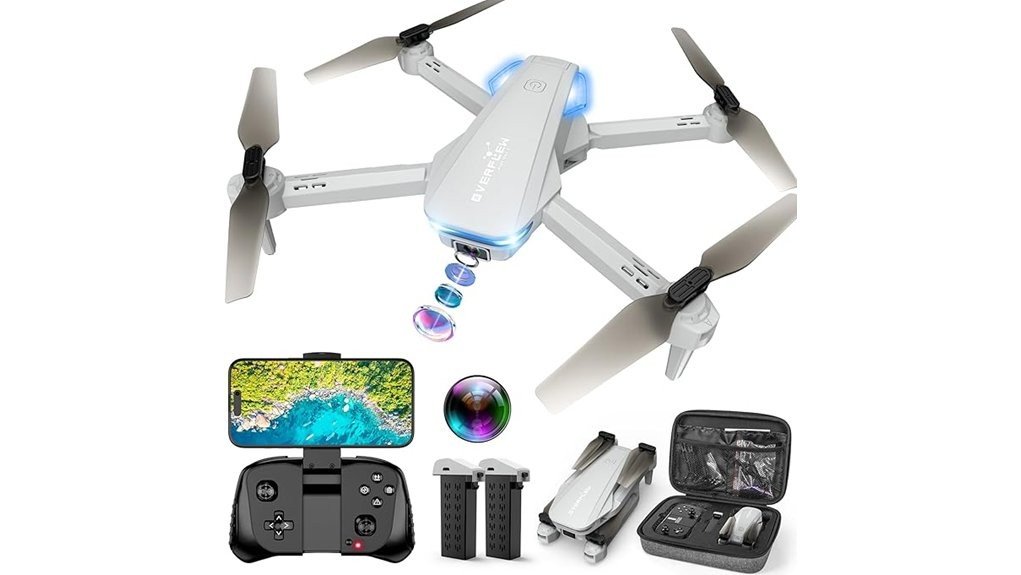
The drone with a 1080P camera is designed for both beginners and seasoned users. Weighing only 146 grams, its compact, foldable design enhances portability. Key features include adjustable camera settings, altitude hold, and one-key takeoff and landing, which facilitate easy operation. With a flight time of 24 minutes, it allows ample opportunity for capturing high-quality aerial images. Understanding its essential features and comparing it to other entry-level models can enhance the user’s experience considerably.
Key Takeaways
- The drone features a 1080P camera, offering superior image quality compared to competitors with lower resolutions.
- It boasts a flight time of 24 minutes, exceeding many similar models that average 20 minutes.
- User-friendly design includes a foldable remote control and adjustable camera settings for versatile shooting angles.
- Safety features like altitude hold and one-key takeoff enhance the flying experience for beginners.
- Lightweight at 146 grams, the drone is easy to transport, making it ideal for outdoor adventures.
Essential Features of the 1080P Camera Drone for Beginners
When considering the essential features of a 1080P camera drone, beginners will find that this foldable remote control quadcopter offers a blend of functionality and ease of use.
Equipped with adjustable camera settings for both front and down views, it enhances photography and videography experiences. The drone also integrates user safety features, including altitude hold and one-key takeoff and landing, ensuring a smooth flight.
With a lightweight design of 146 grams and compact dimensions of 5.5L x 3.3W x 2H inches, it is easy to transport.
Getting Started: How to Fly Your Drone
Flying a drone for the first time can be an exciting and rewarding experience, especially with a user-friendly model like the foldable remote control quadcopter equipped with a 1080P camera.
Flying a drone for the first time is thrilling, especially with an easy-to-use foldable quadcopter featuring a 1080P camera.
To guarantee a smooth flight, beginners should follow a pre-flight checklist:
- Check battery maintenance: Confirm both batteries are fully charged.
- Inspect the drone: Look for any physical damage or loose parts.
- Calibrate the gyroscope: This step is essential for stable flight.
How to Troubleshoot Common Drone Problems
Troubleshooting common drone problems can enhance the flying experience and guarantee the device operates smoothly.
To secure peak performance, battery maintenance is essential; always check battery levels before flights and avoid overcharging.
If the drone experiences connectivity issues, users should verify Wi-Fi connectivity, confirming the smartphone is within range and the app is updated.
In some cases, resetting the drone may resolve persistent problems.
Additionally, calibrating the gyroscope after every power-up or crash can help stabilize flight.
Taking Great Photos and Videos
Capturing stunning photos and videos with the 1080P camera drone can be an enjoyable experience, especially for beginners.
To enhance the quality of their shots, users should consider these key elements:
- Photo Composition: Utilize the rule of thirds to create balanced images.
- Video Stabilization: Engage the drone’s features to minimize shaky footage.
- Lighting Conditions: Ideal lighting improves clarity and vibrance.
How This Drone Compares to Other Entry-Level Drones
When evaluating how this drone compares to other entry-level options, it’s essential to reflect on its features, functionality, and overall value. This drone stands out with its foldable design and user-friendly controls, making it accessible for beginners. With a 1080P camera and various flight features, it offers a compelling package.
| Feature | This Drone | Competitor A |
|---|---|---|
| Camera Resolution | 1080P | 720P |
| Flight Time | 24 minutes | 20 minutes |
| Control Method | Remote/App | Remote Only |
| Weight | 146 grams | 150 grams |
Frequently Asked Questions
How Long Does It Take to Charge the Batteries?
The batteries typically require approximately 60 to 90 minutes for a full charge. This charging efficiency allows users to maximize battery life, ensuring extended flight times for various aerial photography and videography activities.
What Is the Maximum Flight Range of the Drone?
The drone offers a maximum flight range of approximately 100 meters. A photographer might use this range to capture stunning aerial shots, benefiting from the flight stability and camera quality, ensuring clear images from above.
Can the Drone Be Flown in Windy Conditions?
The drone demonstrates moderate wind resistance, but flight stability may vary in stronger winds. Beginners should exercise caution, as gusty conditions can affect control, potentially leading to erratic movements or difficulty in maintaining a steady flight path.
Is a Smartphone Required for Operation?
A smartphone is not required for operation, but smartphone compatibility enhances the experience. With 1080P camera quality, users can utilize the Hiturbo FPV app for improved control and image capture, revealing additional features.
What Happens if the Drone Loses Wi-Fi Connection?
If the drone loses Wi-Fi connection, fail-safe mechanisms activate, typically prompting it to return to the last known location or initiate a controlled landing. Signal loss may disrupt video transmission, impacting real-time feedback for the user.
Conclusion
To sum up, the drone with a 1080P camera emerges as a remarkable companion for both novice and seasoned pilots. Its lightweight, foldable design and impressive 24-minute flight time make it a practical choice for capturing breathtaking aerial imagery. With user-friendly features like adjustable camera settings and altitude hold, it simplifies the flying experience. As a gateway into the world of drone photography, this model offers an exceptional blend of performance and portability, ensuring every flight is a memorable adventure.