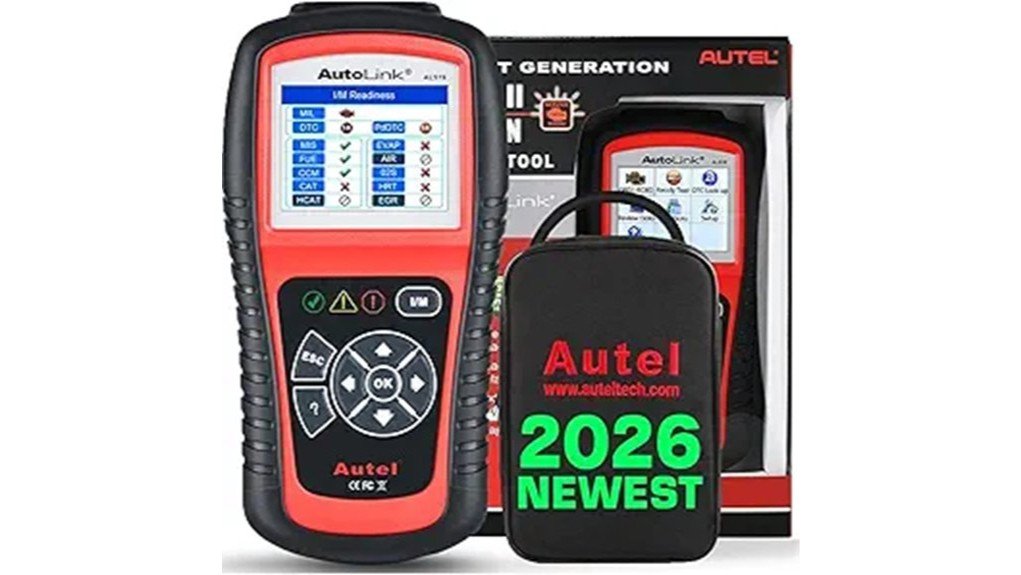
The Autel AutoLink AL519 is an OBD II diagnostic tool tailored for vehicles from 1996 onwards, providing essential functions such as reading and clearing diagnostic trouble codes, live data viewing, and I/M readiness checks. It retrieves both generic and manufacturer-specific codes, enhancing the user’s ability to manage vehicle diagnostics. However, it is incompatible with FCA vehicles produced after 2017. With an easy setup process, users can quickly access valuable insights into their vehicle’s health. Understand the AL519’s features further for ideal use.
Key Takeaways
- The Autel AutoLink AL519 effectively reads and clears both generic and manufacturer-specific OBD II codes, enhancing diagnostic capabilities.
- It provides live data and freeze frame parameters, aiding in the accurate identification of engine issues and Check Engine Lights.
- The tool is compatible with standard OBD II vehicles from 1996 onwards, but excludes FCA models produced after 2017.
- Users can quickly access I/M readiness status checks and quick DTC lookups for a streamlined diagnostic experience.
- Initial setup is straightforward; connect to the OBD II port, power on, select language, and download updates for optimal performance.
What Is the Autel AutoLink AL519?
The Autel AutoLink AL519 is a sophisticated automotive diagnostic tool designed to assist vehicle owners and professionals in troubleshooting OBD II systems.
With its impressive AL519 capabilities, this device caters to standard OBD II vehicles produced in the US from 1996 onward, making it a valuable asset for many.
However, it excludes FCA models after 2017 due to the Secure Gateway system.
The AL519 enables users to read and clear codes, view live data, and perform essential tests, empowering individuals to take control of their vehicle diagnostics.
This tool embodies a step toward automotive independence and informed vehicle management.
Essential Features of the AL519 for Effective Vehicle Diagnostics
Equipped with a range of essential features, the Autel AutoLink AL519 stands out as a reliable tool for effective vehicle diagnostics.
This device guarantees diagnostic accuracy by offering full OBD2 functions, including reading and clearing codes, live data viewing, and I/M readiness status checks.
Additionally, it provides quick DTC lookups, enhancing the user experience through intuitive navigation.
With the ability to retrieve both generic and manufacturer-specific codes, the AL519 empowers users to diagnose complex issues efficiently.
Its freeze frame data and vehicle information retrieval capabilities are invaluable for evaluating used cars, making it a thorough diagnostic solution.
Compatibility: Which Vehicles Work With the AL519?
When considering the Autel AutoLink AL519 for vehicle diagnostics, understanding its compatibility is a key factor in maximizing its utility. The AL519 works with standard OBD II vehicles from 1996 onwards in the US, although it is not compatible with FCA vehicles produced after 2017 due to the Secure Gateway (SGW) system. Checking vehicle compatibility is essential before purchase.
| Vehicle Type | Year Range | Compatibility Status |
|---|---|---|
| Standard OBD II | 1996 and onward | Compatible |
| FCA Vehicles | 2017 and onward | Not compatible |
| Other Manufacturers | Varies | Check before ordering |
Using the AL519 to Diagnose Check Engine Lights?
Utilizing the Autel AutoLink AL519 to diagnose Check Engine Lights (CEL) offers vehicle owners an effective means of understanding and resolving engine issues.
This tool engages in an extensive diagnostic process, reading both generic and manufacturer-specific codes, which aids in identifying the exact cause of the CEL. Additionally, it provides live data and freeze frame parameters, enhancing the diagnostic experience.
Getting Started With the AL519: Tips for Easy Setup
Getting started with the Autel AutoLink AL519 is a straightforward process that can enhance the user’s diagnostic capabilities right from the outset.
To guarantee a smooth initial setup and ideal use of the user interface, consider these tips:
- Connect the AL519 to the vehicle’s OBD II port.
- Power on the device and choose the language settings.
- Familiarize yourself with the menu options for easy navigation.
- Download the latest updates from the Autel website to access enhanced features.
Frequently Asked Questions
How Do I Download the User Manual for the AL519?
To download the user manual for the AL519, users should visit the Amazon product page or request it via email, ensuring device compatibility with their vehicles prior to usage for ideal functionality and understanding.
Can I Use the AL519 on Mac Computers?
The AL519’s compatibility with Mac computers is nonexistent, rendering any connection attempts futile. Users seeking liberation from diagnostic woes must rely on a Windows PC, leaving their Mac dreams unfulfilled in the domain of automotive diagnostics.
What Should I Do if the Device Language Is Incorrect?
To resolve incorrect language settings in device configuration, the user should long press the left button for three seconds, allowing the device to reset and present the proper authorization language for ideal functionality.
How Do I Update the AL519 Software?
To update the AL519 software, one must download the update pack and MaxiLinkII software onto a Windows PC. This troubleshooting step breathes new life into the device, enabling enhanced AL519 features for a seamless experience.
Is the AL519 Suitable for Hybrid or Electric Vehicles?
The AL519 lacks hybrid compatibility and may not effectively support electric vehicle diagnostics. Users seeking extensive tools for hybrid or electric vehicles should explore alternatives specifically designed for those advanced automotive technologies and their unique needs.
Conclusion
In conclusion, the Autel AutoLink AL519 stands out as a robust diagnostic tool, providing extensive features and compatibility for OBD II vehicles. With its user-friendly interface, it simplifies the process of diagnosing issues, particularly when addressing check engine lights. Though it may have limitations with certain FCA models post-2017, the AL519 proves to be a reliable asset in any automotive toolkit. Ultimately, this diagnostic device helps users get to the root of vehicle problems, ensuring they stay ahead of the game.