Disclosure: As an Amazon Associate, we earn from qualifying purchases. If you click a link on this page and make a purchase, we may receive a small commission at no extra cost to you.
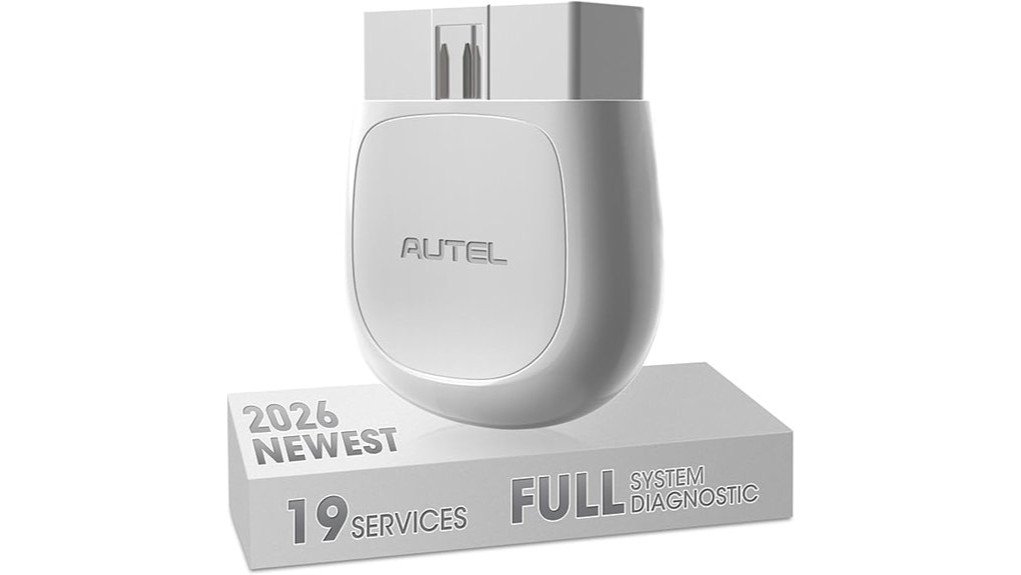
A basic code reader can explain a check engine light, but it may not reach the ABS, airbag, transmission, or service-reset systems you actually need to inspect. The Autel MaxiAP AP200 turns a compatible Android or iOS smartphone into a Bluetooth diagnostic tool with standard OBDII functions, vehicle-specific system scans, and up to 19 maintenance functions. Its biggest strength is the amount of supported diagnostic work available from a compact adapter. Its main limitation is the software model: one vehicle-make package is included, while added makes require in-app purchases and every function depends on the exact vehicle.
Quick Verdict
Rating: 8/10, recommended with caveats
Best For: DIY owners who want deeper diagnostics and service functions for one primary supported vehicle make
Bottom Line: The AP200 provides broad system access, live data, reports, and useful service functions without requiring a dedicated scan-tool screen. It offers less predictable value when you work on many vehicle makes or need functions that are not supported on your exact model and year.
| Specification | Detail |
|---|---|
| Brand | Autel |
| Model | MaxiAP AP200 |
| Product type | Bluetooth OBDII diagnostic adapter with smartphone app |
| Connectivity | Bluetooth 4.2 dual-mode |
| Mobile platforms | Android and iOS smartphones through the MaxiAP200 app |
| Power | Powered through the vehicle diagnostic port, with no internal rechargeable battery |
| Input voltage | 9 to 26 VDC |
| Dimensions | 59 × 44 × 21.5 mm (2.32 × 1.73 × 0.85 inches) |
| Weight | 32.1 g (0.07 lb) |
| Diagnostic coverage | Free standard OBDII functions plus vehicle-specific all-system diagnostics on supported vehicles |
| Service functions | Up to 19, with availability varying by make, model, year, and control module |
| Software package | One vehicle-make software package included; added makes require in-app purchase |
| Useful extras | AutoVIN on compatible vehicles, live data, repair reports, PDF sharing, and vehicle history |
Key Takeaways
- The AP200 offers more than generic engine-code reading because it can scan multiple vehicle systems through compatible vehicle-make software.
- Autel lists up to 19 service functions, including oil reset, electronic parking brake service, battery management, steering-angle calibration, diesel particulate filter functions, TPMS functions, and immobilizer-related functions.
- One vehicle-make package is included. Extra makes require in-app purchases, so multi-brand ownership can increase the total cost.
- The adapter has no display or rechargeable battery. Your phone provides the interface, and the vehicle diagnostic port provides power.
- Coverage is not universal. You should confirm the exact year, make, model, engine, and required function before buying.
Key Features and Functions of the Autel MaxiAP AP200
Full OBDII Functions
The AP200 includes standard OBDII functions for emissions-related diagnostics. You can read and clear supported engine trouble codes, review live sensor data, inspect freeze-frame information, and check emissions readiness. These functions are useful when the check engine light comes on or when you want to see whether the vehicle has completed its readiness monitors.
Clearing a code does not repair the cause. Save the report first, diagnose the fault, and clear the code only after the repair or test procedure is complete.
Vehicle-Specific System Scans
With the correct vehicle-make software, the AP200 can access supported systems beyond the engine computer. Depending on the vehicle, that can include ABS, SRS, transmission, body, steering, chassis, climate control, and other electronic modules. You can read and clear supported diagnostic trouble codes and view available live data in text or graph form.
The phrase “all-system diagnostics” does not mean every module on every vehicle will be available. Coverage changes by platform, year, regional version, and module design, so a compatibility check matters more than the headline function count.
Maintenance and Reset Functions
Autel advertises support for up to 19 service functions. Examples include oil-service reset, electronic parking brake service, battery registration or BMS reset, steering-angle calibration, ABS bleeding, DPF regeneration, throttle adaptation, TPMS-related functions, and injector coding. The exact menu you see depends on the vehicle.
These functions can help after routine maintenance, but some procedures require mechanical work, a battery charger, a safe lifting setup, or a specific sequence from the service manual. The scanner should guide a supported electronic procedure, not replace the repair itself.
AutoVIN, Reports, and Vehicle History
AutoVIN can identify supported vehicles and reduce manual entry. After a scan, the app can store vehicle history and generate repair reports that you can save or share in PDF format. This is useful when you want a record before clearing codes, need to compare results after a repair, or want to send findings to a technician.
Before You Buy: The included software covers one vehicle make, and added makes require in-app purchases. Service functions also vary by exact vehicle, and the Amazon listing states that tablets are not supported. Confirm your VIN, phone compatibility, and required function before you redeem the included make.
What Is the Autel MaxiAP AP200?
The Autel MaxiAP AP200 is a compact wireless adapter that plugs into a vehicle’s 16-pin diagnostic connector. It communicates with the MaxiAP200 app on a compatible smartphone, so the phone becomes the screen, control panel, graph display, and report viewer.
It is made mainly for DIY owners and mobile technicians who want more access than a basic check-engine code reader provides. Its strongest use case is one primary supported vehicle make, especially when you need ABS, SRS, transmission, live-data, or service-reset access without buying a larger dedicated tablet scanner.
Who Should Buy It?
Best For
- DIY owners who maintain one primary supported vehicle make
- Drivers who need ABS, SRS, transmission, or other module diagnostics beyond generic OBDII
- Users who want live data, saved reports, and service functions on a smartphone
Skip If
- You regularly diagnose many unrelated vehicle makes and want predictable lifetime coverage for all of them
- You need a shop-level scanner for advanced programming, coding, or a consistent professional workflow
- You plan to use only a tablet or do not want an app-based diagnostic tool
Design, Power, and Connectivity
At 59 × 44 × 21.5 mm and 32.1 grams, the AP200 is small enough to store in a glove box or tool pouch. It has no built-in screen and no rechargeable battery. Once plugged into the diagnostic port, it draws power from the vehicle and sends data to your phone over Bluetooth.
The app-based design keeps the hardware compact and makes graphing or sharing reports easier than on a tiny handheld display. The tradeoff is that your experience depends on phone compatibility, app installation, account access, Bluetooth permissions, and software downloads.
App Setup and Ownership Experience
Initial setup requires the MaxiAP200 app, an Autel account, and device binding. After registration, you select the included vehicle-make software through the app. Standard OBDII functions remain available, while deeper system access and service functions use the relevant make package.
Extra vehicle makes are sold through in-app purchases. Autel support information states that the included make can be used without a yearly renewal, while added make packages are valid for a limited period and may require renewal. This arrangement offers strong value for one main vehicle make but can become less attractive for a household or workshop with many brands.
Pro Tip: Before selecting your included vehicle-make package, confirm your VIN and the exact service function you need through Autel’s coverage information or seller support. Choosing by brand name alone does not guarantee that every function will work on every model year.
How It Performs in Real Use
For Check Engine Light and Emissions Checks
The free OBDII functions make the AP200 useful for reading engine codes, viewing freeze-frame data, checking live values, and reviewing emissions readiness. This is the simplest use case and usually requires less vehicle-specific coverage than ABS, SRS, or maintenance functions.
For ABS, Airbag, and Transmission Faults
On a supported vehicle, the AP200 can reach modules that basic code readers cannot. That helps you identify which system stored the fault and review available data before deciding whether the job is suitable for DIY work. Airbag and brake faults are safety-related, so use the scan result as diagnostic information and follow the service manual or a qualified technician’s guidance.
After Routine Maintenance
The AP200 may perform oil reset, battery registration, electronic parking brake service, steering-angle calibration, ABS bleeding, and other procedures when the vehicle supports them. Check the function before starting the repair, because completing the mechanical work without the required electronic procedure can leave warning lights or incomplete adaptations.
For a Used-Car Inspection
A full-system scan can reveal stored faults across multiple modules and gives you a report to discuss with the seller or a mechanic. It should not replace a professional pre-purchase inspection because a scanner cannot confirm mechanical condition, collision repairs, fluid quality, or faults that are not currently stored.
Setup Tips and Common Mistakes
- Confirm coverage first: Check the exact year, make, model, engine, region, and required function before purchase.
- Use a stable phone connection: Install the correct MaxiAP200 app, allow required permissions, and follow the in-app Bluetooth instructions.
- Keep vehicle voltage stable: For long scans or service procedures, follow the vehicle service instructions and use an approved battery maintainer when required.
- Save results before clearing: Export or record the codes, freeze-frame data, and reports so you can compare them after repair.
- Do not treat a reset as a repair: A warning light that returns needs diagnosis. Repeatedly clearing safety or emissions codes can hide useful evidence.
- Unplug after use: Remove the adapter when the session is complete, especially before leaving the vehicle parked for an extended period.
Compatibility and Safety
Autel lists broad coverage across many North American, European, and Asian makes, but the practical question is whether the AP200 supports your exact vehicle and the exact function you need. Newer communication protocols, regional variations, older non-standard connectors, and manufacturer security systems can affect access.
Use the scanner with the vehicle parked safely and follow the procedure shown in the app and service manual. Do not run moving-component tests in an unsafe area, work under an unsupported vehicle, or perform brake, airbag, immobilizer, or battery procedures without understanding the required steps. When a fault affects steering, braking, airbags, high-voltage hybrid systems, or drivability, professional diagnosis is the safer choice.
Pros and Cons
Pros
- Accesses supported systems beyond generic engine diagnostics
- Offers up to 19 maintenance and reset functions on compatible vehicles
- Includes live data, AutoVIN, PDF reports, and saved vehicle history
- Compact adapter uses your phone as a larger, familiar display
- One vehicle-make software package is included with the device
Cons
- Added vehicle makes require in-app purchases and may require renewal
- Function coverage varies by make, model, year, and control module
- App setup and phone compatibility add more steps than a standalone code reader
How It Compares to Alternatives
The BlueDriver Bluetooth scanner is worth comparing when you prefer a simpler no-subscription ownership model and guided repair reports on supported vehicles. The AP200 makes more sense when vehicle-specific service functions are the priority and one included make covers most of your work.
TOPDON TopScan Lite is another phone-based alternative and adds bidirectional control among its advanced features, but those advanced functions use a subscription model. Compare exact vehicle coverage, renewal terms, and the specific reset or active test you need rather than choosing only by the number of advertised functions.
Is It Worth the Price?
The AP200 sits in the budget-to-mid-range part of the Bluetooth scanner market, but it provides deeper supported-system access than a basic engine code reader. It is strong value for the price when you maintain one main vehicle make and need live data, reports, ABS or SRS access, or supported service functions.
Its value falls when you need many extra make packages, guaranteed coverage for a rare function, or advanced shop-level programming. Your total cost should include the adapter, any added make software, and possible renewals, not just the hardware price.
Frequently Asked Questions
Will the Autel AP200 work with my vehicle?
It supports many North American, European, and Asian vehicles, but coverage varies by year, model, engine, region, and module. Check your VIN and the exact function you need before buying.
Is the AP200 a one-time purchase or subscription tool?
The hardware includes standard OBDII functions and one vehicle-make software package. Added makes require in-app purchases, and those added packages may require renewal after their access period ends.
Does the AP200 have a rechargeable battery?
No. The adapter receives power from the vehicle through the OBDII diagnostic port, while your phone runs the app and display.
Can I use the AP200 with a tablet?
The product listing describes the AP200 as a smartphone tool and states that tablets are not supported. Use a compatible Android or iOS phone and check the current app requirements before purchase.
Can the AP200 diagnose hybrid or electric vehicles?
Some hybrid or electric models may be covered, but support is not universal and high-voltage system access varies. Confirm the VIN and required module with Autel before relying on it for an electrified vehicle.
Can it perform ABS bleeding or battery registration?
Those functions are included among the AP200’s supported service categories, but availability depends on the vehicle. Confirm the exact procedure before starting brake or battery work.
Can the AP200 clear ABS, SRS, and check engine codes?
It can read and clear supported codes in those systems when the vehicle and software package allow access. Clear codes only after recording the data and correcting the cause, especially for brake and airbag faults.
Does the AP200 replace a professional scan tool?
It is capable for DIY diagnostics and supported service work, but it does not replace a professional tool for every make, advanced programming task, security function, or complex diagnosis. A shop-level scanner also offers a more consistent workflow across many vehicles.
The Bottom Line
The Autel MaxiAP AP200 is a strong choice when you want broad phone-based diagnostics and service functions for one main supported vehicle make. Skip it if you need tablet use, predictable multi-brand coverage, or advanced professional programming. Its main strength is the depth available from a compact adapter, while its main limitation is vehicle-specific software coverage.
Ready to Buy?
Check the latest price, phone requirements, and vehicle coverage before you decide.