Disclosure: As an Amazon Associate, we earn from qualifying purchases. If you click a link on this page and make a purchase, we may receive a small commission at no extra cost to you.
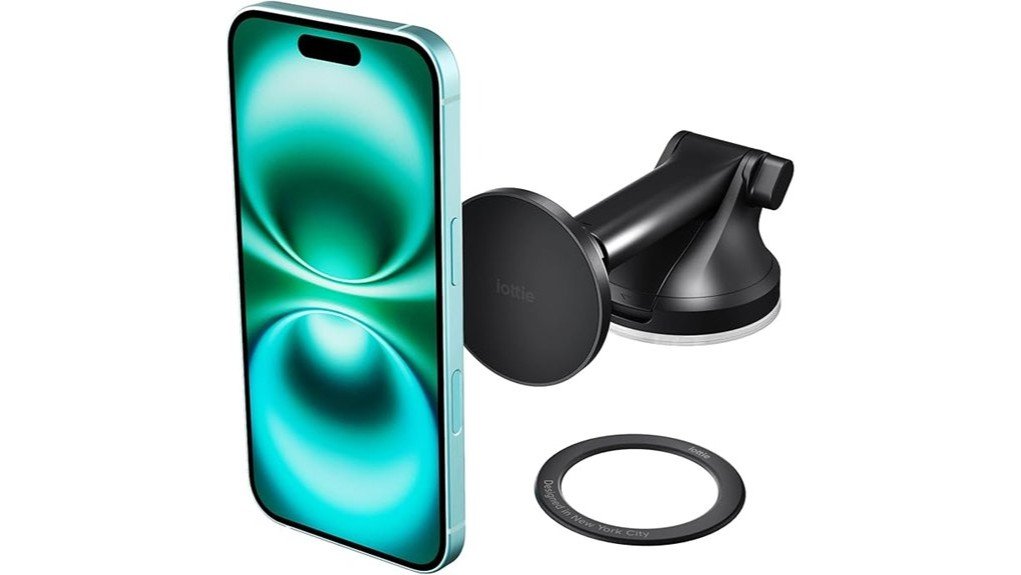
A car phone mount should put navigation within easy view without forcing you to open clamps on every trip. The iOttie iTap 3 Magnetic Dash & Windshield Mount uses ten sets of heat-resistant N52 magnets, a reusable suction base, and an adjustable arm for fast one-handed mounting. It works directly with MagSafe-compatible phones and cases, while an included magnetic ring adapter supports many other smartphones. Its main weakness is not the magnetic face, but installation: textured or leather dashboards, unsuitable cases, poor surface prep, and cabin heat can reduce reliability.
Quick Verdict
Rating: 8.2/10, Recommended with caveats
Best For: Drivers who want quick magnetic mounting, dashboard or windshield placement, and flexible viewing angles without built-in charging.
Bottom Line: The iOttie iTap 3 combines a strong magnetic face with useful reach and angle adjustment. Buy it for convenient hands-free navigation, but check your dashboard material and phone case before committing to the adhesive parts.
| Specification | Detail |
|---|---|
| Brand | iOttie |
| Model | iTap 3 Magnetic Dash & Windshield Mount |
| Product type | Non-charging magnetic car phone holder |
| Dimensions | 5.3 × 2.5 × 2.7 inches |
| Weight | 4.5 ounces |
| Magnetic system | Ten sets of heat-resistant N52 magnets |
| Mounting locations | Dashboard or windshield |
| Base | Reusable suction cup with sticky gel formula and locking lever |
| Arm adjustment | Extends from 4 to 6.75 inches and pivots through a 260° arc |
| Viewing adjustment | Rotating ball joint for tilt, swivel, portrait, and landscape positioning |
| Contact surface | Anti-slip silicone mounting face |
| Compatibility | MagSafe and Qi2-compatible devices; other smartphones and cases via the included magnetic ring adapter |
| Included parts | Mount, suction base, magnetic ring adapter, alignment guide, and dashboard pad |
| Charging | No built-in wireless charging |
| Warranty | Two years through iOttie, subject to the manufacturer’s terms |
What Is the iOttie iTap 3?
The iOttie iTap 3 is a magnetic car phone holder for dashboard or windshield installation. Instead of gripping your phone with side arms, it uses a silicone-covered magnetic face so you can attach and remove your device with one hand.
MagSafe-compatible phones and cases can connect directly. For non-MagSafe or non-Qi2 devices, iOttie includes a magnetic ring adapter and alignment guide. The mount is designed for drivers who use navigation, hands-free calls, or media controls and want more positioning freedom than a fixed vent clip provides.
Key Takeaways
- Ten sets of heat-resistant N52 magnets provide the main holding force.
- The arm extends from 4 to 6.75 inches and pivots through a 260° arc.
- The mount supports MagSafe and Qi2 devices, plus many other phones through the included adapter ring.
- The reusable suction base works on suitable dashboards or windshields, but surface material and preparation matter.
- The adapter ring is not intended for metal, glass, or textured cases, or cases with built-in wallets or grips.
- This model holds your phone but does not charge it.
Who Should Buy It?
Best For
- Drivers who want one-handed magnetic attachment without opening clamp arms.
- Cars where a dashboard or windshield position gives a clearer view than a vent mount.
- MagSafe users, or non-MagSafe users with a smooth compatible case for the adapter ring.
Skip If
- Your only practical mounting area is leather, sharply curved, heavily textured, or regularly coated with protectant.
- Your case has metal, glass, deep texture, a wallet, or a built-in grip and you need the adapter ring.
- You want a mount with built-in Qi2 or MagSafe charging.
Before You Buy: The dashboard pad uses semi-permanent adhesive, and the magnetic adapter ring can be removed but not repositioned. Test the mount location, phone angle, and charging setup before attaching either adhesive part.
Discover Key Features of the iOttie iTap 3
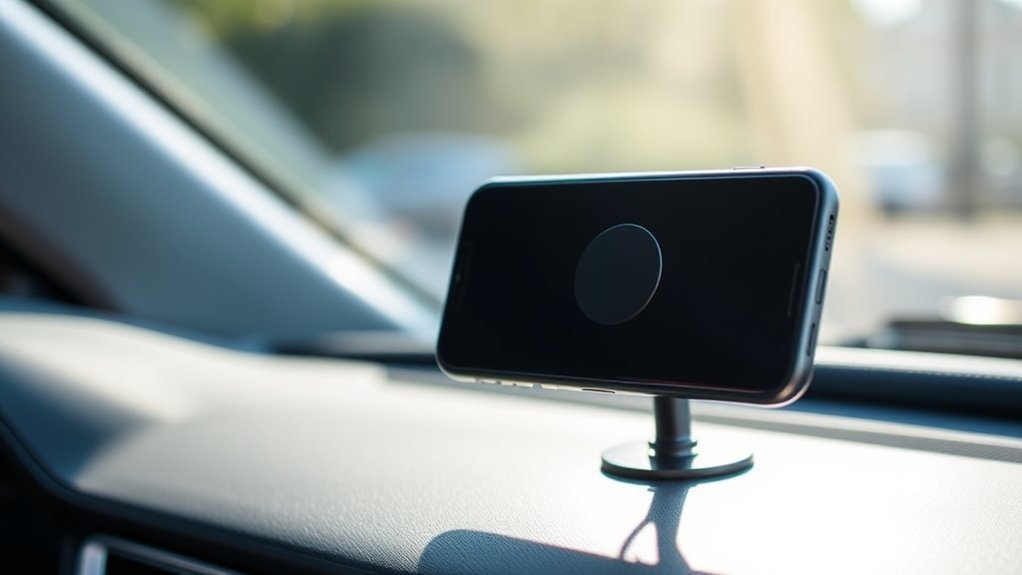
The iTap 3 focuses on three practical features: magnetic attachment, adjustable reach, and a reusable suction base. Together, they let you place the phone closer to your natural line of sight while keeping removal fast when you leave the car.
Magnetic Hold
The mounting face uses ten sets of N52 magnets. With a MagSafe phone or a correctly installed adapter ring, the broad magnetic contact helps keep the device steady during normal turns, braking, speed bumps, and rough pavement.
The hold still depends on the phone side. Thick cases, uneven accessories, or an off-center ring reduce contact and add leverage. A strong magnet cannot correct a poorly aligned adapter or an unsuitable case surface.
Adjustable Arm and Viewing Angle
The telescopic arm extends from 4 to 6.75 inches and pivots through a 260° arc. A rotating ball joint then lets you tilt or swivel the magnetic face and switch between portrait and landscape views.
This range is useful when a deep dashboard puts a fixed mount too far away. It also helps you move the screen away from glare. Extend only as far as needed, because a longer arm can magnify movement on rough roads.
Reusable Suction Base
The base combines sticky gel suction with a locking lever. It can attach to a windshield or to the included dashboard pad on a suitable flat dashboard surface. The suction cup can be rinsed with warm water and air-dried when it needs its tack restored.
The dashboard pad is not a universal solution. It is intended for a flat, hard surface, and iOttie recommends windshield mounting instead of using it on leather dashboards.
Fit and Compatibility
MagSafe-series iPhones and compatible cases attach directly to the mount. Qi2-compatible devices can also use the magnetic system. Other smartphones need the included adapter ring attached to the outer back surface of the phone or case.
The ring adapter is not designed for metal, glass, or textured cases, or for phones and cases with built-in wallets or grips. It must sit flat and centered, so a smooth case is the safer choice. Once attached, the ring can be removed but cannot be repositioned.
Also check your vehicle layout. The final position should not block your view through the windshield, warning lights, infotainment controls, climate controls, vents, or an airbag deployment area.
Materials, Build, and Design
The mount measures 5.3 × 2.5 × 2.7 inches and weighs 4.5 ounces. Its compact magnetic face uses an anti-slip silicone finish to add grip and reduce hard contact with your phone or case.
The arm, pivot knob, ball joint, locking lever, and suction cup give you several adjustment points without making the holder bulky. The main durability question is the installation surface, not the magnetic head. Heat, dust, oil, and repeated repositioning can weaken suction or adhesive performance over time.
Installing the iOttie iTap 3: A Step-by-Step Guide
- Choose the location: Pick a flat dashboard area or a legal windshield position that keeps the screen visible without blocking the road or safety equipment.
- Clean and dry the surface: Remove dust, oil, and dashboard protectant. The manufacturer recommends installing when the surface and product are above 65°F.
- Prepare dashboard mounting: Apply the dashboard pad to a suitable flat surface and press it evenly. Wait at least 20 minutes before attaching the mount.
- Attach the suction base: Remove the protective film, press the cup firmly onto the dashboard pad or windshield, and push down the locking lever.
- Install the adapter if needed: Clean the phone or case, center the alignment guide, apply the magnetic ring, and press firmly. Wait at least one hour before using it.
- Set the viewing angle: Adjust the arm length, pivot, and ball joint, then tighten the knobs.
- Test the setup: Attach your phone and check for slipping, excessive arm movement, blocked controls, and a clear view of the road before driving.
Pro Tip: Start with the arm near its shortest position and extend it only enough for a comfortable glance angle. Less extension reduces leverage on the suction base and usually limits visible shake.
How It Performs in Real Use
Daily Commuting
The magnetic face is convenient for short, repeated trips because you can place and remove your phone without resetting clamp arms. It works best when your phone or case has direct, flat contact with the mount.
Navigation and Rideshare Driving
The extendable arm and rotating ball joint make it easier to position a map near your normal sightline. Portrait mode suits turn-by-turn directions, while landscape mode gives you a wider map. Set the route and angle before moving.
Rough Roads and Speed Bumps
The N52 magnetic system is designed to hold a properly aligned phone on rough roads. Stability can still decrease when you fully extend the arm, use a heavy accessory, or place the adapter ring behind a thick or uneven case.
Long Road Trips
On longer drives, the wider adjustment range helps you reduce awkward head movement and glare. Because this model does not charge, you will still need a separate cable or charger for long navigation sessions.
Compatibility and Safety
A phone holder can support hands-free navigation, but it does not make screen interaction safe while driving. Set your route, call, or playlist before moving, and make changes only when parked or when local law allows.
Windshield mounting rules vary by location. Keep the holder outside critical sightlines and away from airbags. Check the suction cup, dashboard pad, arm knobs, and magnetic ring regularly, especially after hot weather or a long period of use.
Magnetic rings and plates can interfere with wireless charging when placed incorrectly. MagSafe or Qi2 alignment may still work with a compatible case, but test charging before making an adapter ring permanent.
Common Strengths and Tradeoffs
The strongest part of the design is convenience. You get quick one-handed attachment, more reach than a fixed mount, and a choice between dashboard and windshield placement.
The main tradeoffs come from compatibility and installation. The adapter ring is not suitable for every case material, the dashboard pad cannot be remounted after removal, and suction performance depends on a clean, flat surface. Buyers in very hot climates should inspect the setup more often.
Pros and Cons
Pros
- Ten sets of heat-resistant N52 magnets provide a broad magnetic hold.
- Works directly with MagSafe and Qi2 devices, with an adapter for many other phones.
- Arm extends from 4 to 6.75 inches and pivots through 260°.
- Ball joint supports portrait, landscape, tilt, and swivel adjustment.
- Reusable suction base supports dashboard or windshield placement.
Cons
- The adapter ring is unsuitable for metal, glass, textured, wallet, or grip-style cases.
- The dashboard pad is semi-permanent and cannot be remounted after removal.
- There is no built-in wireless charging, and a fully extended arm may show more movement.
Placement Tips for Better Results
- Test from the driver’s seat: Hold the mount in place before installing the pad so you can check reach, glare, controls, and road visibility.
- Use the windshield for difficult dashboards: Leather, deep texture, sharp curves, or soft-touch surfaces are poor choices for the dashboard pad.
- Keep the arm short when possible: Extra reach is useful, but it also creates more leverage and visible movement.
- Center the adapter ring: Use the alignment guide and attach the ring to the outermost smooth surface, not under a thick case layer.
- Recheck after heat exposure: Pressures and adhesives can change in a hot parked car, so inspect the mount before placing your phone on it.
Is It Worth the Price?
The iOttie iTap 3 sits in the mid-range of non-charging magnetic mounts. Its value comes from the verified N52 magnet array, adjustable arm, reusable suction base, included compatibility parts, and two-year manufacturer warranty.
It offers strong value for the price when you need dashboard or windshield positioning and prefer a magnetic face over a cradle. It is less compelling if you need wireless charging, use an incompatible case, or cannot find a flat and safe mounting surface.
How It Compares to Alternatives
The iOttie iTap 3 Air Vent Mount is worth comparing when you want a smaller installation and do not want adhesive on the dashboard. The iOttie Easy One Touch 5 uses a cradle instead of a magnetic ring, which may suit thick or irregular cases. The iOttie Velox Qi2 Mini adds wireless charging for buyers who want power and mounting in one device.
The iTap 3 Dash & Windshield Mount makes the most sense when adjustable reach and magnetic convenience matter more than charging.
Frequently Asked Questions
Does the iOttie iTap 3 work with phone cases?
It works directly with MagSafe-compatible cases and with many smooth non-MagSafe cases through the included ring adapter. The adapter is not designed for metal, glass, or textured cases, or cases with built-in wallets or grips.
Can I use the mount on the dashboard and windshield?
Yes. Use the included dashboard pad on a suitable flat dashboard surface, or attach the suction cup directly to a clean windshield. Do not use the dashboard pad on the windshield.
Does it charge the phone?
No. This iTap 3 model is a magnetic holder without built-in wireless charging. You will need a separate cable or car charger during long navigation sessions.
How do I restore the suction cup?
Rinse the suction cup under warm water and let it air dry. Reinstall it only after both the cup and mounting surface are clean and fully dry.
Can I reposition the magnetic adapter ring?
No. The ring can be removed after installation, but it cannot be repositioned. Use the alignment guide, test your planned setup, and press it down only after confirming the location.
How long should I wait after installation?
The manual says to wait at least 20 minutes after applying the dashboard pad before attaching the mount. After applying the magnetic ring adapter, wait at least one hour before using it.
Will the mount work in hot weather?
The magnetic system uses heat-resistant N52 magnets, but cabin heat can still stress the suction cup, dashboard pad, and adhesive ring. Inspect all attachment points regularly and remove the phone if the mount begins to loosen.
Who should skip this phone holder?
Skip it if you need built-in wireless charging, have no safe dashboard or windshield location, or use a case that is incompatible with the adapter ring. A cradle or vent mount may fit those situations better.
The Bottom Line
The iOttie iTap 3 is a strong choice for drivers who want quick magnetic attachment, adjustable reach, and dashboard or windshield mounting. Its main strengths are the ten-set N52 magnetic system and flexible arm, while its main limitations are case compatibility, adhesive setup, and the lack of charging. Skip it if your dashboard or phone case does not suit the installation requirements.