Keeping a USB-C laptop charged during a long drive takes more power than a basic phone adapter can provide. The UGREEN 130W USB C Car Charger aims to solve that problem with three charging ports, including a USB-C port rated up to 100W. This review explains its verified port layout, included cable, vehicle compatibility, safety claims, and real buying limits. Its strongest feature is laptop-level USB-C output, but you still need the right device, cable, and vehicle socket to reach the advertised charging speeds.
UGREEN 130W USB C Car Charger Review
Quick Verdict
Editorial Rating: 8.5/10
Best For: Drivers who need to charge a USB-C laptop and one or two smaller devices in a 12V to 24V vehicle.
Bottom Line: The 100W USB-C port, second 30W USB-C port, and 22.5W USB-A port give you a useful mix for road trips and mobile work. The tradeoff is that actual output depends on your device, cable, port combination, and vehicle power socket.
Key Specifications
| Specification | Detail |
|---|---|
| Brand | UGREEN |
| Model | CD293 |
| Manufacturer Part Number | 90889 |
| ASIN | B0B3CSLPZR |
| Product Type | Three-port vehicle power-outlet charger |
| Total Listed Output | Up to 130W |
| USB-C Ports | One port up to 100W and one port up to 30W |
| USB-A Port | Up to 22.5W, with charging output dependent on device and protocol |
| Vehicle Compatibility | Vehicles with a compatible 12V to 24V cigarette-lighter or accessory socket |
| Charging Protocols Listed | USB Power Delivery, PPS, and Quick Charge support are listed by UGREEN |
| Included Cable | 3.3 ft (1 m) 100W USB-C cable with an E-Marker chip |
| Enclosure | Black PC material with a scratch-resistant finish listed by the manufacturer |
| Item Weight | 45 g, according to the current Amazon product information |
| Indicator | Blue LED port light |
| Package Contents | Car charger, 100W USB-C cable, and user manual |
| Safety Claims | The listing states protection against overcharge, overcurrent, overvoltage, overheating, and short circuits. It also lists UL testing and RoHS, CE, and FCC compliance. |
What Is the UGREEN 130W USB C Car Charger?

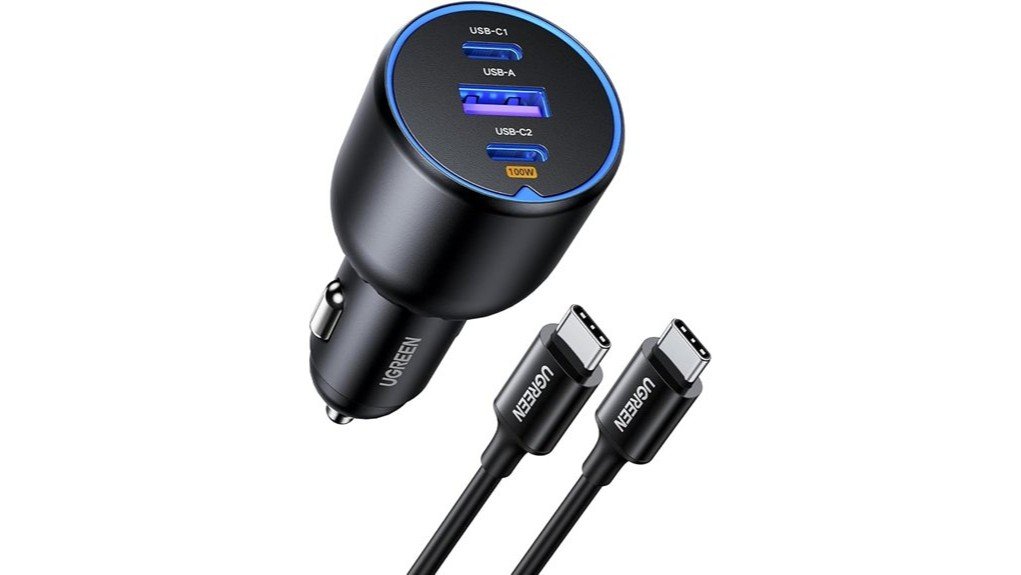
The UGREEN CD293 is a compact charger that plugs into a compatible vehicle accessory socket. It gives you three outputs: a 100W USB-C port for higher-power devices, a 30W USB-C port for phones and tablets, and a USB-A port rated up to 22.5W for older cables and accessories.
The main reason to choose it is the 100W USB-C connection. That output can meet the charging needs of many USB-C laptops, provided the laptop accepts USB-C Power Delivery and does not require more than the charger can supply. UGREEN also includes a 3.3 ft 100W USB-C cable, so you do not have to buy a high-wattage cable separately for the main port.
This is not a power bank, battery booster, or inverter. It only supplies power while connected to an active vehicle socket, and it cannot add charging features that your device does not support.
Who Should Buy It?
Best For
- Commuters and mobile workers who need to maintain a USB-C laptop battery while driving
- Road-trip users who want to charge a laptop, phone, and USB-A accessory from one socket
- Drivers with a 12V to 24V vehicle socket who want both USB-C and USB-A support
Skip If
- You only charge one phone and do not need laptop-level output
- Your laptop requires more than 100W or does not accept charging through USB-C Power Delivery
- Your vehicle lacks a compatible accessory socket or cuts power in a way that does not suit your setup
Before You Buy: Check the wattage shown on your laptop’s original charger and confirm that the laptop accepts USB-C Power Delivery. A laptop that needs more than 100W may charge slowly, hold its battery level, or continue losing power during demanding use.
Feature-by-Feature Review
100W USB-C Laptop Charging
The 100W USB-C port is the product’s main selling point. It gives you much more headroom than common 20W to 45W car chargers, which can be enough for phones but may struggle with larger laptops. For a compatible MacBook, Windows ultrabook, tablet, Steam Deck, or other USB-C device, the higher output can reduce battery loss during navigation, work, or entertainment.
That 100W figure is a maximum, not a guaranteed draw. Your device negotiates the charging level with the charger, and the result depends on the Power Delivery profile the device supports. Battery temperature, battery level, software limits, and current device workload can also reduce charging speed.
30W USB-C Port for Phones and Tablets
The second USB-C port is rated up to 30W. That makes it a practical match for many phones, smaller tablets, earbuds, handheld devices, and power banks. It also lets you keep the 100W port reserved for a laptop instead of sharing one high-power connection between devices.
Some phones use brand-specific charging systems, so they may not reach their highest advertised speed from a standard USB Power Delivery charger. The phone will still control how much power it accepts.
USB-A Support for Older Cables
The USB-A port corrects a major weakness in the original two-port description. It is rated up to 22.5W and gives you a connection for older phone cables, dash cams, GPS units, Bluetooth accessories, and other USB-A devices. This makes the charger easier to use in a mixed-cable household.
The USB-A port does not turn an older device into a USB-C PD device. Its actual speed depends on the cable, charging protocol, and device support. Treat the 22.5W number as the port maximum rather than a promise for every accessory.
Three-Device Charging
You can connect three devices at once, but the charger does not provide the maximum rating of every port at the same time in every combination. Power is allocated according to the connected devices and supported protocols. Your most demanding device should use the 100W USB-C port, while lower-power devices use the 30W USB-C and USB-A ports.
This arrangement is useful for a driver and passenger who need different cable types. It also helps when one device, such as a dash cam or GPS unit, stays connected while you charge a laptop and phone.
Compact PC Enclosure and LED Light
The charger uses a black PC enclosure and weighs about 45 g according to the current Amazon product information. Its small body is easier to leave in a center console than a bulky inverter, and the scratch-resistant finish should handle normal travel use better than a glossy surface.
A blue LED makes the ports easier to locate at night. The light is useful in a dark cabin, but drivers who dislike visible cabin lighting should consider where their accessory socket sits before buying.
Included 100W USB-C Cable
UGREEN includes a 3.3 ft USB-C cable rated for 100W. The listing states that the cable has an E-Marker chip, which helps supported devices and chargers identify high-current cable capability. This matters because a low-rated cable can limit a 100W port to a lower charging level.
The included cable covers one USB-C device. You still need separate cables for the 30W USB-C port and USB-A port, so check the connectors used by every device you plan to charge.
Compatibility and Safety
UGREEN lists the charger for 12V to 24V cigarette-lighter or accessory sockets, which covers many cars, SUVs, and trucks. The physical fit can still vary. A deeply recessed socket, loose outlet, protective cover, or nearby control may affect how securely the charger sits.
The Amazon listing states that the charger is UL tested and lists RoHS, CE, and FCC compliance. It also lists protection against overcharge, overcurrent, overvoltage, overheating, and short circuits. These protections are useful, but you should still stop using the charger if the plug becomes loose, damaged, unusually hot, or discolored.
Keep the ports dry and free of metal debris. Do not cover the charger while it is operating, and do not use a damaged cable. Follow your vehicle manual if the accessory socket has a wattage limit or special instructions.
How It Performs in Real Use
For Laptop Work on the Road
The 100W port is best used to maintain or recharge a compatible USB-C laptop between stops. It can be especially helpful for mobile workers who use a laptop at client sites, rest areas, or job locations. A high-performance laptop under heavy load may draw more than 100W, so the charger may slow battery loss instead of rapidly increasing the charge level.
For Phones and Tablets
The 30W USB-C port is a sensible place for a phone or tablet while the 100W port handles a laptop. Many mainstream devices can charge quickly within this range, but the final speed is controlled by the device. Using a short, good-quality cable helps reduce avoidable power loss.
For Three Devices at Once
The three-port layout is useful when you need to keep a laptop, phone, and USB-A accessory connected. Expect power sharing and protocol negotiation when several devices are active. For the most predictable result, connect the laptop to the 100W port first, then add lower-power devices.
For Road Trips and Shared Vehicles
The mix of two USB-C ports and one USB-A port reduces the need to swap adapters in a family or work vehicle. The included cable is long enough for many front-seat layouts, while the illuminated ports are easier to find after dark. You may still need a longer cable for rear-seat use.
Setup Tips and Common Mistakes
- Use the correct port: Connect your laptop or highest-power device to the 100W USB-C port.
- Check the cable rating: Use the included 100W cable or another properly rated 5A USB-C cable for high-power charging.
- Confirm device input: A 100W charger cannot force a phone, tablet, or laptop to accept 100W.
- Check the socket: Push the charger in firmly, but do not force it into a damaged or unusually tight outlet.
- Avoid heat buildup: Keep the charger uncovered and away from spilled liquids, loose coins, and metal debris.
- Unplug when appropriate: Some vehicles keep the accessory socket powered after the ignition is off, which may drain the vehicle battery over time.
Pro Tip: Test your full setup before a long trip. Connect the laptop with the included cable, start the apps you normally use, and confirm that the battery percentage rises or stays stable while the engine is running.
Pros and Cons
Pros
- 100W USB-C port can support many USB-C laptops
- Three-port layout includes two USB-C ports and one USB-A port
- Included 3.3 ft 100W USB-C cable reduces the need for an extra purchase
- 12V to 24V socket support suits many passenger and commercial vehicles
- Blue LED helps you find the ports in a dark cabin
Cons
- Maximum output is not guaranteed for every device or multi-port combination
- Laptops that require more than 100W may charge slowly during heavy use
- Only one charging cable is included, so the other two ports need separate cables
Is It Worth the Price?
The UGREEN 130W USB C Car Charger sits above basic phone-only adapters because it combines laptop-level USB-C output, a second USB-C port, USB-A support, and an included 100W cable. It offers the most value when you regularly charge a laptop in the car or share one socket among several devices.
It is not the best fit for a driver who only needs occasional phone charging. A smaller 30W to 45W adapter can handle that job with less unused capacity. The value also falls if your laptop cannot charge through USB-C or needs more than 100W during normal use.
How It Compares to Alternatives
The newer UGREEN 145W 4-Port Retractable Car Charger is worth comparing if you want a built-in retractable cable and an extra port. Anker’s 167.5W three-port car charger offers higher total output for users with more demanding devices. A lower-output dual USB-C model, such as UGREEN’s 63W car charger, can make more sense when you only need phones, tablets, or a light USB-C laptop.
The UGREEN 130W model remains a balanced choice when you want a 100W laptop port, a separate 30W USB-C port, USB-A support, and an included high-wattage cable without moving to a larger four-port design.
Frequently Asked Questions
Does the UGREEN 130W charger really have three ports?
Yes. The current listing shows two USB-C ports and one USB-A port. The USB-C ports are listed at up to 100W and 30W, while the USB-A port is listed at up to 22.5W.
Can it charge a laptop at 100W?
It can supply up to 100W from its high-power USB-C port to a compatible device. Your laptop must support USB-C Power Delivery at that level, and you need a suitable 5A cable, such as the included 100W cable.
Will all three ports run at their maximum ratings together?
Do not assume that every port will provide its single-port maximum at the same time. The charger allocates power according to the connected devices and charging protocols, so multi-device output can change.
Does the package include a cable?
Yes. The listing includes one 3.3 ft (1 m) USB-C cable rated for 100W, plus the charger and user manual. You need separate cables for devices connected to the other USB-C and USB-A ports.
Does it work in cars and trucks?
UGREEN lists compatibility with 12V to 24V cigarette-lighter or accessory sockets. Check your vehicle manual and the physical socket location, since outlet depth and nearby controls can affect fit.
Can I use it while the vehicle is off?
That depends on your vehicle. Some accessory sockets turn off with the ignition, while others remain powered. Unplug the charger when parked if your socket stays active and you want to avoid unnecessary battery drain.
Why is my laptop charging below 100W?
The laptop may request a lower Power Delivery profile, the cable may have a lower rating, or the device may reduce power because of heat or battery level. Heavy laptop use can also consume power as fast as the charger supplies it.
Who should skip this car charger?
Skip it if you only need a low-power phone charger, your laptop does not accept USB-C charging, or your laptop requires more than 100W for normal use. You should also choose another option if you prefer a built-in retractable cable.
The Bottom Line
The UGREEN 130W USB C Car Charger is recommended for drivers who need a 100W laptop port plus separate connections for a phone and an older USB-A accessory. Its three-port layout and included 100W cable are the main strengths, while variable power allocation and the 100W laptop ceiling are the main limitations. Skip it if you only charge one phone or need a built-in cable.
Ready to Buy?
Check the latest price, seller, package contents, and product details before you decide.