Disclosure: As an Amazon Associate, we earn from qualifying purchases. If you click a link on this page and make a purchase, we may receive a small commission at no extra cost to you.
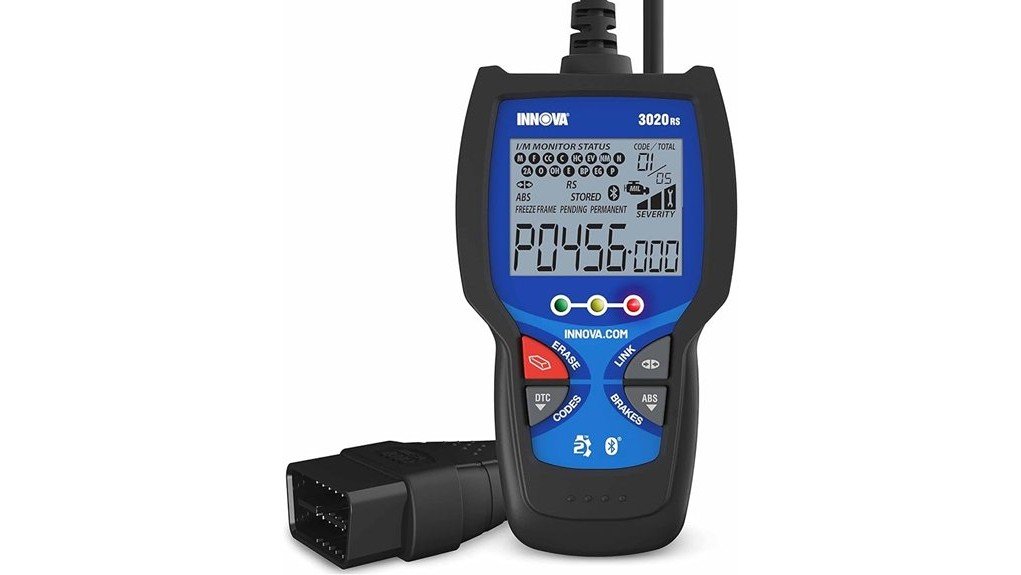
A check-engine or ABS warning can make it hard to judge whether you have a minor fault or a problem that needs prompt attention. The INNOVA 3020RS OBD2 scanner reads and clears engine and supported ABS codes, checks emissions readiness, shows code-severity guidance, and connects to the optional RepairSolutions2 app. Its simple display and hotkeys suit drivers who want useful answers without shop-level complexity, but it does not provide live-data streaming, bidirectional controls, or module programming. This review helps you decide whether its focused feature set matches your vehicle and repair needs.
Quick Verdict
Rating: 8/10, Recommended with caveats
Best For: Drivers and home DIY users who want check-engine, emissions-readiness, supported ABS, Mode 6, and app-guided repair information in a compact handheld scanner.
Bottom Line: The INNOVA 3020RS offers more guidance than a basic engine-code reader through code severity, ABS coverage, Mode 6 data, and RepairSolutions2 reports. Its main tradeoff is limited diagnostic depth, so it is not the right tool for live data, SRS codes, service resets, programming, or bidirectional tests.
Key Takeaways
- It reads and clears standard OBD2 engine codes and supported ABS codes.
- Smog-check LED indicators show emissions-monitor readiness before an inspection.
- Code-severity guidance helps you sort urgent concerns from issues that may allow more time for diagnosis.
- Mode 6 provides onboard monitor test results that can help with misfire and sensor-related troubleshooting.
- The optional RepairSolutions2 app adds vehicle-specific fixes, parts guidance, maintenance schedules, recalls, technical service bulletins, and report exports.
- The 3020RS does not offer live-data streaming, battery testing, SRS diagnostics, oil-reset service, bidirectional controls, or programming.
| Specification | Detail |
|---|---|
| Brand | INNOVA |
| Model | 3020RS |
| Product type | Vehicle-powered handheld OBD2 code reader and scanner |
| Primary diagnostics | Read and erase check-engine codes, supported ABS codes, emissions readiness, code severity, and Mode 6 results |
| Display | 2.8-inch screen with an all-in-one layout that can show more than 20 pieces of diagnostic information |
| Controls | Dedicated hotkeys for common functions |
| Dimensions | 4.5 x 3.29 x 0.7 inches |
| Power | Draws power through the attached OBD2 cable |
| App support | Optional RepairSolutions2 app for iPhone and Android, with no subscription required |
| Vehicle coverage | Most OBD2-compliant vehicles in the United States and Canada; feature coverage varies by year, make, model, and system |
| ABS coverage note | Amazon lists ABS diagnostics for most 2006 and newer domestic and Asian vehicles; confirm your exact vehicle before buying |
| Included items | Code reader with attached OBD2 cable and Quick Start Guide |
| Warranty | One-year manufacturer warranty |
What Is the INNOVA 3020RS?
The INNOVA 3020RS is an entry-level handheld scanner for common engine, emissions, and supported ABS diagnostics. You connect its attached cable to your vehicle’s OBD2 data link connector, and the scanner draws power from the vehicle. The 2.8-inch screen and dedicated hotkeys are designed to keep routine code checks simple.
The scanner reads and erases check-engine codes, displays emissions-monitor status, retrieves supported ABS faults, assigns code-severity guidance, and provides Mode 6 test results. Its RepairSolutions2 connection can turn those results into a more detailed report with verified fixes, likely parts, maintenance schedules, recalls, and technical service bulletins.
It is a focused code reader rather than a full-system professional scanner. You do not get live-data streaming, battery and charging tests, airbag codes, oil-light resets, active tests, ECU programming, or OBD1 coverage.
Before You Buy: Do not assume every 1996 and newer vehicle supports every 3020RS function. Standard OBD2 engine coverage is broad, but ABS and enhanced features vary by year, make, model, region, and control module. Check INNOVA’s vehicle-coverage tool before ordering.
Who Should Buy It?
Best For
- Drivers who want to identify check-engine codes before paying for shop diagnosis.
- Home DIY users who need emissions readiness, Mode 6, code severity, and supported ABS information.
- Owners who value app-based repair reports but still want a stand-alone handheld code reader.
Skip If
- You need live sensor data, graphing, battery testing, SRS codes, or service resets.
- You need bidirectional controls, key programming, ECU programming, or deep all-module diagnostics.
- You are outside the United States or Canada, use an OBD1 vehicle, or have not confirmed system coverage.
Engine Codes, Code Severity, and Mode 6
The 3020RS handles the task most buyers expect first: reading and clearing diagnostic trouble codes linked to the check-engine light. A one-button workflow reduces menu steps, while the code-severity feature helps you judge whether the scanner considers a fault more urgent or suitable for later inspection.
Severity guidance is useful for prioritizing your next step, but it is not permission to ignore symptoms. Stop driving and seek professional help when the vehicle overheats, loses oil pressure, misfires severely, loses power, smells of fuel, or behaves unsafely.
Mode 6 adds onboard monitor test results that can help you investigate misfires, sensor performance, and other monitored systems. It offers deeper clues than a code number alone, although interpreting those results may require vehicle-specific service information.
ABS and Emissions-Readiness Functions
Supported ABS code reading gives the 3020RS more safety-system coverage than an engine-only reader. Amazon states that ABS diagnostics apply to most 2006 and newer domestic and Asian vehicles, while INNOVA notes that exact coverage depends on the vehicle. Use the coverage checker rather than assuming your ABS module is supported.
The smog-check LEDs show whether required emissions monitors are ready, not ready, or reporting a problem. This is useful before an inspection and after a repair, battery disconnect, or code clearing. Clearing codes resets monitor status, so your vehicle may need normal drive cycles before it becomes inspection-ready again.
Display, Hotkeys, and Everyday Usability
The 2.8-inch display uses an all-in-one layout that can present more than 20 pieces of diagnostic information on one screen. That claim refers to displayed scan information, not live-data streaming. Dedicated hotkeys provide fast access to common tasks and help new users avoid a deep menu structure.
The housing measures 4.5 x 3.29 x 0.7 inches, so it stores easily in a glove box, tool drawer, or road-trip kit. The cable stays attached, which removes one loose part but also means cable damage would affect the whole unit.
Because the scanner is powered through the OBD2 port, you do not need batteries or a charging routine. You can also complete basic scans without using a phone, then connect to the app when you want a longer report.
RepairSolutions2 App Support
The RepairSolutions2 app is optional and free to use. It can receive scan data from the 3020RS and add vehicle-specific fixes, parts guidance, maintenance schedules, predicted repairs, recalls, technical service bulletins, and report-export tools. INNOVA states that the service has no subscription fee and offers free updates.
This extra context can help you prepare for a repair or ask better questions at a shop. It does not prove that a suggested part has failed. A trouble code identifies a circuit, condition, or system, and proper testing may still be needed before you buy parts.
The app supports iPhone and Android devices, but the scanner remains useful without it. This makes the 3020RS less phone-dependent than a Bluetooth-only dongle while still giving you app-based reports when needed.
Compatibility and Safety
The 3020RS is designed for North American OBD2 protocols and works with most compatible vehicles in the United States and Canada. Standard OBD2 engine coverage generally starts with 1996 model-year passenger vehicles, but enhanced ABS functions are more limited. Newer FCA vehicles may also restrict erase or service functions when secure gateway access is required.
Never force the connector into the data link port. Plug it in with the ignition in the position stated by the manual, keep the cable away from pedals, and do not operate the scanner while driving. ABS and brake warnings require special caution because a scan result does not confirm that the vehicle is safe to drive.
The manufacturer also lists a California Proposition 65 warning for exposure to DinP. Review the current product warning and instructions if that notice affects your buying decision.
How It Performs in Real Use
For a Check-Engine Light
The scanner quickly retrieves the stored engine code and code-severity information. You can record the code and severity result, then use RepairSolutions2 for likely fixes and related service information. This creates a better starting point than replacing a part based only on the dashboard light.
For an ABS Warning
On a supported vehicle, the 3020RS can retrieve and erase ABS codes after you address the fault. Coverage is the deciding factor here. If your vehicle is not supported or braking feels abnormal, a professional scan and brake inspection are safer choices.
Before an Emissions Inspection
The readiness LEDs help you see whether the emissions monitors have completed. This can prevent an avoidable inspection trip after a battery disconnect or code reset. The scanner does not make a vehicle ready by itself, and it cannot guarantee a passing result.
For a Used-Car or Road-Trip Check
The compact scanner can reveal stored engine or supported ABS faults and show readiness status before a trip or used-car purchase. Treat this as one part of the check. It cannot inspect mechanical wear, hidden body damage, fluid condition, tires, or every control module.
Setup Tips and Common Mistakes
Find the OBD2 port, usually under the driver-side dashboard, and insert the attached connector gently. Turn the ignition to the position required by the scanner, allow it to link with the vehicle, and run the scan before erasing anything.
Save or photograph each code and the related report. Clearing codes can erase useful diagnostic evidence and reset emissions monitors. Only erase a code after you have documented it and completed the needed inspection or repair.
When a code returns, test the system instead of repeatedly clearing the light. Also avoid buying the first part named in an app report without checking wiring, connectors, related sensors, service bulletins, and vehicle symptoms.
Pro Tip: Before scanning, write down the warning lights, symptoms, weather, engine temperature, and driving conditions. That context can help you or a mechanic connect the code to the actual fault.
Pros and Cons
Pros
- Reads and clears check-engine and supported ABS codes.
- Includes emissions-readiness LEDs, code severity, and Mode 6 results.
- 2.8-inch all-in-one display and hotkeys reduce menu searching.
- Optional RepairSolutions2 app adds fixes, parts guidance, recalls, schedules, and reports.
- Vehicle-powered design includes an attached cable and needs no scanner batteries.
Cons
- No live-data streaming, graphing, battery test, SRS codes, or oil-reset function.
- ABS and enhanced coverage vary by vehicle and may be limited on newer secured systems.
- It cannot perform bidirectional tests, programming, or full professional diagnosis.
Customer Support, Updates, and Warranty
INNOVA provides American customer support and lists the 3020RS in its current product-manual library. The product includes a one-year manufacturer warranty, and the Amazon package listing includes the code reader with attached cable plus a Quick Start Guide.
INNOVA states that scanner updates are free and RepairSolutions2 does not require a subscription. Keep your proof of purchase and review the current warranty terms because coverage can depend on where and how the product was purchased.
Is It Worth the Price?
The INNOVA 3020RS sits in the entry-level to lower mid-range part of the scanner market. It offers better guidance than a basic engine-only code reader because you get supported ABS diagnostics, emissions readiness, code severity, Mode 6, and an optional repair-report app.
It is a smart buy for everyday use when those exact functions match your vehicle. You get less value if you need live sensor data, battery testing, SRS coverage, reset functions, or active tests, because upgrading once may cost less than buying another scanner later.
The strongest reason to choose it is the balance between stand-alone simplicity and optional app guidance. The strongest reason to skip it is the narrow feature ceiling.
How the INNOVA 3020RS Compares to Alternatives
The INNOVA 3040RS is the closer upgrade if you need live-data streaming and a battery or charging-system test. The INNOVA 3100RS adds features such as SRS codes and oil-light reset, which better suit drivers who want broader maintenance coverage.
For bidirectional controls, advanced routines, and deeper system access, the INNOVA 5610 is the more capable option. The 3020RS makes the most sense when you want a simpler and less expensive tool focused on engine, emissions, Mode 6, and supported ABS faults.
Frequently Asked Questions
Will the INNOVA 3020RS work with every 1996 and newer vehicle?
No. Standard OBD2 engine coverage is broad, but ABS and other enhanced functions vary by year, make, model, region, and module. Check your exact vehicle in INNOVA’s coverage tool before buying.
Does the INNOVA 3020RS show live data?
No. Its all-in-one screen can show more than 20 pieces of diagnostic information, but INNOVA’s comparison chart does not list live-data streaming for the 3020RS. Consider the 3040RS or a higher model if live sensor readings are required.
Can the 3020RS diagnose and clear ABS codes?
Yes, on supported vehicles. Amazon lists ABS coverage for most 2006 and newer domestic and Asian vehicles, but exact support varies. A cleared warning does not repair the braking fault.
Is the RepairSolutions2 app required?
No. You can read codes and use the handheld scanner without the app. The free app adds repair guidance, reports, maintenance schedules, recalls, technical service bulletins, and parts information.
Does the app or scanner require a subscription?
INNOVA states that RepairSolutions2 is free and that scanner updates do not carry subscription or update fees. App features and policies can change, so review the current terms when setting up the tool.
Does the INNOVA 3020RS need batteries?
No. It receives power from the vehicle through the attached OBD2 cable. Your vehicle must provide enough electrical power for the scanner to communicate with its control modules.
What comes with the scanner, and how long is the warranty?
The Amazon listing includes the code reader with its attached OBD2 cable and a Quick Start Guide. It also lists a one-year manufacturer warranty; keep your receipt and check the current warranty conditions.
Who should skip the INNOVA 3020RS?
Skip it if you need OBD1 support, live data, battery testing, SRS codes, service resets, active tests, or programming. It is also a poor choice outside the United States and Canada or when your vehicle’s ABS coverage is not confirmed.
The Bottom Line
The INNOVA 3020RS earns an 8/10 rating for drivers and home DIY users who want simple engine-code checks, emissions readiness, Mode 6, supported ABS diagnostics, and optional RepairSolutions2 guidance. Its easy controls and focused coverage are the main strengths, while the lack of live data and advanced service functions is the main limitation. Choose a higher INNOVA model if you need broader system access.
Ready to Buy?
Check the latest price, vehicle coverage, and product details before you decide.